Most teams adopt end-to-end encrypted messaging apps after something uncomfortable happens: a sensitive screenshot lands in the wrong channel, a contractor keeps access too long, or a private discussion moves across three consumer apps because nobody defined the right place for it.
Teams think the problem is chat privacy. The real problem is communication architecture.
Encryption matters. But the UI is not the system. The practical question is how identity, devices, metadata, retention, recovery, and user behavior fit together when people are moving fast.
In 2026, end-to-end encrypted messaging apps are no longer a niche tool for activists and cryptography people. They are part of normal work for privacy-conscious users, security teams, journalists, founders, clinicians, lawyers, remote teams, and anyone else who handles information that should not be casually exposed.
The mistake teams make is choosing an app the way they choose a note-taking tool: screenshots, features, pricing, and vibes. That changes the conversation in the wrong direction. A useful way to think about it is this: secure messaging is a workflow decision with cryptography inside it.
Table of contents
- Why end-to-end encrypted messaging apps are an architecture decision
- What end-to-end encryption does not solve
- The decision model for choosing end-to-end encrypted messaging apps
- Identity, device trust, and key verification
- Message state, retention, and administrative control
- Team deployment pattern for secure messaging
- Implementation workflow for remote teams
- Failure modes in end-to-end encrypted messaging apps
- Security posture and post-quantum reality
- Where qrypt.chat fits
Why end-to-end encrypted messaging apps are an architecture decision

The app is not the boundary
End-to-end encryption protects message content between communicating endpoints. That is valuable, but it does not automatically protect the human workflow around the message.
A private chat can still leak through screenshots, notifications, device compromise, weak account recovery, cloud backups, copied text, unmanaged exports, and social mistakes. In team environments, the biggest risks are often not cryptographic breaks. They are operational gaps.
A secure messaging app should be evaluated as part of a communication boundary:
- Who is allowed to enter the conversation?
- Which devices can read the content?
- How are keys generated, stored, rotated, and verified?
- What happens when someone loses a phone?
- How long should messages live?
- Can administrators control access without becoming content custodians?
- What metadata is visible to the service, administrators, or counterparties?
Practical rule: If the workflow assumes encryption will compensate for weak identity, unmanaged devices, or sloppy offboarding, the workflow is already broken.
For individuals, the boundary might be simple: a trusted phone, a small contact list, and disappearing messages for sensitive topics. For organizations, the boundary includes employee lifecycle, device management, incident response, legal obligations, and support.
The threat model sets the design
The right end-to-end encrypted messaging apps for a family group are not necessarily the right apps for a security operations team, legal practice, or remote startup handling customer data.
The practical question is not which app is best in the abstract. It is what you are defending against.
Common threat models include:
- Opportunistic snooping by platforms, networks, or casual observers
- Account takeover after SIM swap, phishing, or credential theft
- Device loss or theft
- Internal oversharing between teams or contractors
- Metadata exposure showing who talks to whom and when
- Long-term confidentiality risks for highly sensitive records
- Regulatory or contractual obligations around communications
That changes the conversation. A team discussing product roadmap leaks needs a different setup than a human rights group protecting sources. A remote company needs practical onboarding and offboarding. A security team may need strict device verification and limited message retention.
Related reading from our network: teams building agent-heavy workflows face similar questions about state, identity, and validation in interactive presentation tools, even though the surface is different.
What end-to-end encryption does not solve
Metadata still needs a plan
End-to-end encryption usually protects message content, not every surrounding signal. Depending on the service architecture, metadata may include account identifiers, timestamps, device identifiers, group membership, IP-derived access patterns, notification routing, and contact discovery signals.
Metadata can be sensitive. Knowing that a journalist spoke with a source, that a board member joined a crisis group, or that an employee is messaging legal counsel at midnight can reveal useful information without exposing message text.
The mistake teams make is treating content confidentiality as the whole privacy model. It is not. You need to ask what metadata exists, who can see it, how long it persists, and whether it is minimized by design.
A practical metadata review should include:
- Account identifiers: phone number, email, username, or pseudonymous handle
- Contact discovery: address book upload, hashed lookup, or invite-only flow
- Group visibility: whether membership is hidden from the provider
- Notification behavior: message previews, push tokens, and lock-screen leakage
- Server logs: retention windows and operational access
- Abuse controls: how spam, harassment, and account recovery are handled
Practical rule: Treat metadata as a separate data class. If you do not define it, you will accidentally retain and expose it.
For public consumer conversations, metadata may be acceptable. For sensitive team, medical, legal, security, or executive communication, it needs explicit handling.
Endpoints are where most failures happen
What breaks in practice is rarely the encryption algorithm. It is the endpoint.
A perfectly encrypted message is still readable on an unlocked laptop, an infected phone, a synced desktop client, a compromised account, or a device belonging to a former contractor. If users take screenshots or forward content into email, the encrypted channel becomes a staging area for leakage.
Endpoint controls are not glamorous, but they matter:
- Screen lock and biometric requirements
- Device encryption
- OS patching
- Session timeout
- App-level lock
- Notification preview controls
- Remote wipe and device revocation
- Restricted desktop clients for high-risk roles
Security professionals already know this, but many encrypted chat deployments skip it because the app itself feels safe. That is the trap. If the device is trusted forever, every message on that device is trusted forever.
The decision model for choosing end-to-end encrypted messaging apps
Map conversations to risk tiers
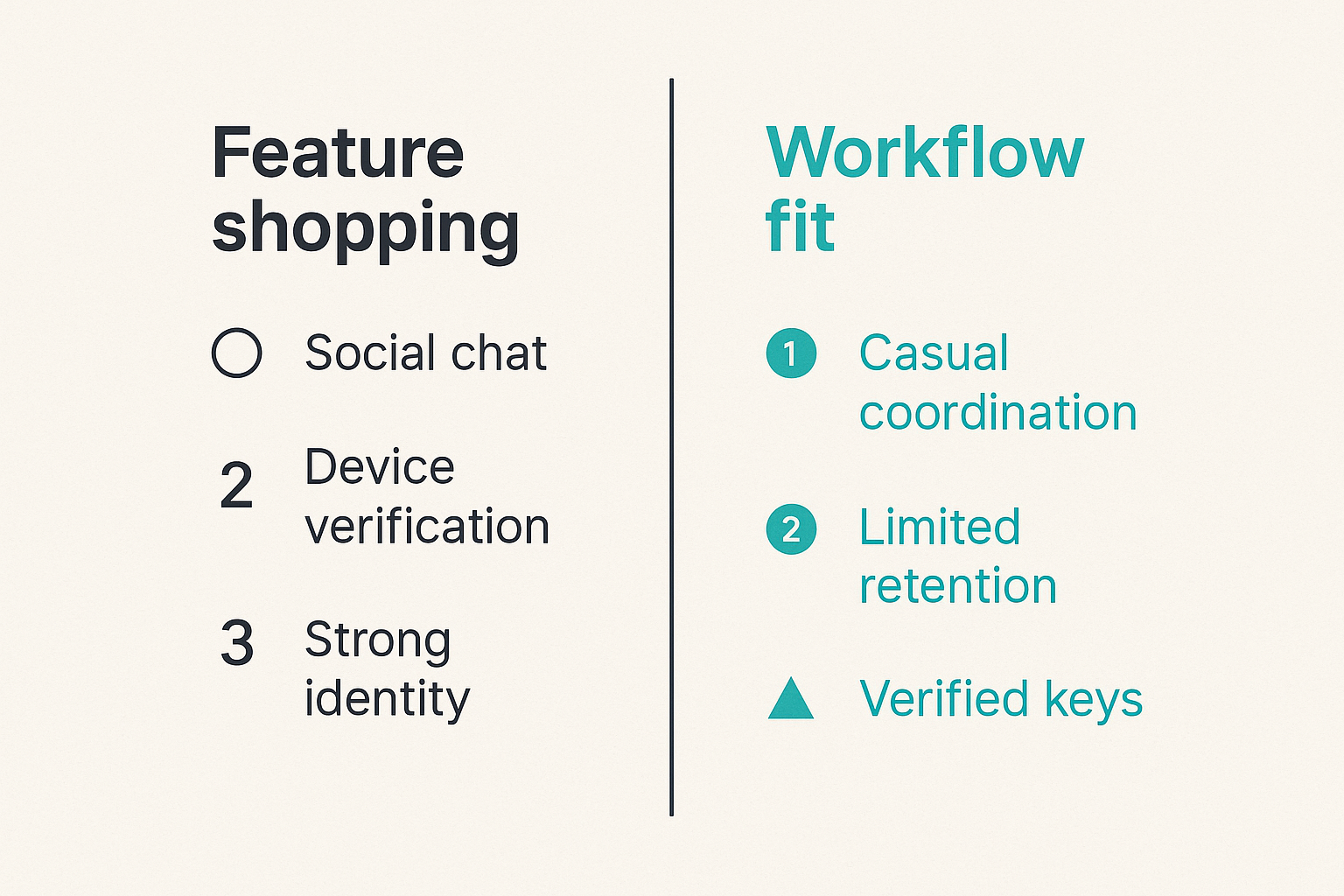
Choosing end-to-end encrypted messaging apps gets easier when you stop comparing feature lists and start mapping conversations.
Not every chat needs the same control level. Over-securing low-risk chatter creates friction and workarounds. Under-securing sensitive workflows creates exposure.
A useful tiering model looks like this:
| Tier | Example conversations | Required controls | Common mistake |
|---|---|---|---|
| Low | Social chat, casual coordination | Basic E2EE, sane notifications | Treating it like regulated data |
| Medium | Customer issues, internal planning | Device verification, limited retention, group access review | Letting channels grow unmanaged |
| High | Legal, incident response, executive decisions | Strong identity, strict device rules, short retention, no previews | Allowing exports and unmanaged desktop clients |
| Critical | Source protection, sensitive security events, high-risk investigations | Minimal metadata, verified keys, narrow membership, documented response plan | Assuming any popular app is enough |
This table is not a compliance framework. It is an operating tool. It forces the team to decide where friction belongs.
Practical rule: Put friction where the risk lives. Do not make every conversation painful, and do not make sensitive conversations casual.
Compare by operational controls, not logos
Feature shopping usually produces weak decisions. Most apps can claim encryption, group chat, file sharing, and disappearing messages. The differentiator is how the system behaves under stress.
Compare options using operational questions:
| Evaluation area | Weak implementation | Stronger implementation |
|---|---|---|
| Identity | Phone number is the only durable identity | Account model supports verification and recovery planning |
| Key changes | Users ignore warnings | Key changes are visible, explainable, and auditable by the user |
| Devices | Unlimited linked devices with little review | Device list is visible and revocable |
| Retention | Users choose random settings | Defaults align with risk tiers |
| Backups | Cloud backups silently bypass encryption goals | Backup behavior is explicit and controllable |
| Admin model | Admins can add users casually | Membership changes follow approval rules |
| Support | Recovery requires insecure shortcuts | Recovery is documented without exposing content |
The practical question is what happens on a bad Tuesday: someone loses a device, an executive changes phones, a contractor leaves, a user reports suspicious login behavior, or a legal hold conflicts with deletion settings.
If the product cannot answer those scenarios cleanly, the app may still be good for personal privacy but weak for team operations.
Related reading from our network: home media and privacy stacks have a similar lesson, because reliability depends on the whole system rather than one attractive interface; see this adjacent guide to streaming, torrents, IPTV, and home media architecture.
Identity, device trust, and key verification
Contact discovery and account takeover
Identity is where secure messaging gets messy. People want convenience. Security wants assurance. Attackers exploit the gap.
Phone-number-based identity is easy, but it inherits telecom risk. Email-based identity is familiar, but it inherits mailbox risk. Username-based identity can reduce exposure, but it requires better discovery and verification patterns.
For sensitive communication, contact discovery should not silently upload more than necessary. Users should understand whether the app uses address book upload, private contact discovery, manual invites, links, QR codes, or organization-managed membership.
Account takeover planning should answer:
- Can an attacker register a victim's account on a new device?
- What alerts appear when devices change?
- Do contacts see key change warnings?
- Is there a recovery process that bypasses user control?
- Can administrators restore access without gaining message content?
A useful model is to separate account recovery from content recovery. Recovering a user account should not automatically recover historical message plaintext unless that is an explicit, controlled design decision.
Device lifecycle rules
Every secure messaging deployment needs a device lifecycle. Without one, trust accumulates forever.
Minimum rules should cover:
- Approved device types
- Personal versus managed devices
- Desktop app policy
- Browser session policy
- Lost device reporting
- Remote revocation
- Key change review
- Device replacement procedure
For individuals, that might be as simple as reviewing linked devices monthly. For teams, device trust should be part of onboarding and offboarding.
A simple device policy can look like this:
secure_messaging:
  mobile_app: required
  desktop_app: allowed_for_medium_risk
  browser_access: disabled_for_high_risk
  lock_screen_previews: disabled
  linked_device_review: monthly
  lost_device_report_sla: same_day
  offboarding_device_revocation: required
The point is not the syntax. The point is making the rules explicit enough that people know what to do before an incident.
Message state, retention, and administrative control
Deletion is a workflow, not a promise
Disappearing messages are useful, but they are not magic. A disappearing message can be copied, photographed, quoted, cached in notifications, captured by malware, or discussed in another channel.
Deletion settings should match the conversation tier. Low-risk chats can retain longer history for convenience. High-risk conversations should default to short retention and avoid unnecessary attachments.
The mistake teams make is setting disappearance timers without defining the business reason. A 24-hour timer might be appropriate for incident coordination. It might be a disaster for customer support decisions that need an audit trail. A 90-day retention period might be fine for planning but excessive for source protection.
Ask four questions:
- Does this conversation need memory?
- Who needs access to that memory?
- What harm comes from retaining it?
- What harm comes from deleting it?
Those answers should drive retention, not default app settings.
Backups, exports, and legal holds
Backups are where private messaging often stops being private. Some apps encrypt backups strongly. Some rely on platform cloud backups. Some allow exports that users store anywhere.
If your workflow depends on confidentiality, document backup behavior. If your workflow depends on records, document retention behavior. Trying to get both without tradeoffs usually creates confusion.
Organizations also need to be honest about legal and regulatory requirements. End-to-end encryption can conflict with centralized archiving models. That does not make E2EE wrong. It means the organization needs to choose which conversations belong in secure messaging and which belong in systems designed for records management.
For privacy-sensitive users, it is worth reading the service's privacy posture before trusting it with high-risk conversations. qrypt.chat publishes its privacy information at qrypt.chat privacy, which is the kind of page users should review before adopting any secure communication tool.
Related reading from our network: teams that publish niche technical or pricing content face a different version of the same problem, where freshness and trust depend on process; this guide to making niche price content citeable by AI answer engines is adjacent but useful for thinking about documentation quality.
Team deployment pattern for secure messaging
Default settings that prevent leaks
Secure defaults matter because users rarely tune settings correctly under pressure. The more sensitive the workflow, the less you should rely on individual preference.
Good defaults for many teams include:
- Disable message previews on lock screens
- Require app lock or device biometric protection
- Use short retention for high-risk groups
- Restrict group creation for sensitive spaces
- Require approval before adding external users
- Limit file sharing in critical channels
- Review linked devices on a schedule
- Keep sensitive incident rooms small
Practical rule: Defaults are policy. If you leave risky options enabled, you have chosen convenience over control whether you admit it or not.
This does not mean turning every setting to maximum paranoia. It means matching defaults to the actual workflow. A customer support group may need longer context. A security incident room may need tighter membership and shorter retention.
Onboarding, offboarding, and recovery
Onboarding is not just inviting someone to a chat. It is identity proofing, device setup, expectation setting, and group placement.
A workable onboarding checklist:
- Confirm identity through an approved channel
- Install the approved app version
- Configure lock screen and app lock settings
- Verify key or safety number for high-risk contacts
- Add user only to required groups
- Explain retention and forwarding rules
- Record who approved access
Offboarding needs the same seriousness:
- Remove user from groups
- Revoke linked devices where supported
- Rotate sensitive group membership or keys if needed
- Confirm shared files are not lingering in unmanaged storage
- Review whether the user had access to high-risk rooms
Recovery is the painful middle. Users lose phones. People forget credentials. Executives replace devices at the worst possible time. A secure recovery process should restore access without normalizing unsafe exceptions.
Implementation workflow for remote teams
A practical rollout sequence
Remote teams need secure messaging that survives real operations. The rollout should be boring, documented, and tested.
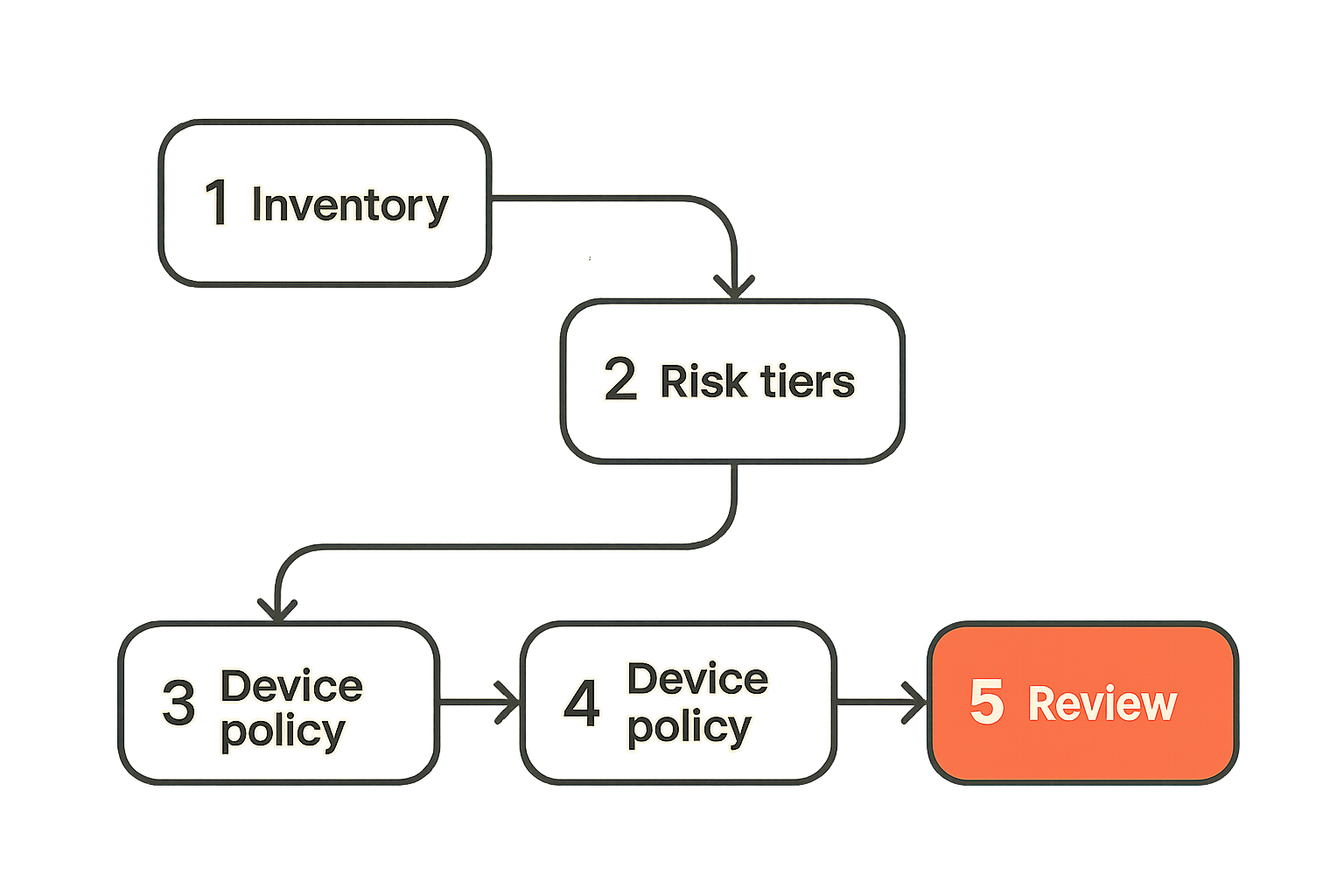
A practical sequence:
- Inventory communication types. List where sensitive conversations currently happen: email, Slack, SMS, consumer chat, project tools, calls, and documents.
- Define risk tiers. Decide which conversations require end-to-end encrypted messaging, which need records, and which can stay in normal tools.
- Choose identity rules. Decide whether accounts are tied to phone numbers, emails, usernames, or managed organizational identity.
- Set device policy. Define approved devices, desktop access, lock requirements, and lost-device handling.
- Configure retention. Create defaults by conversation type instead of letting each group decide randomly.
- Pilot with one workflow. Use a real team, such as incident response or executive coordination, not an artificial test room.
- Document support paths. Explain recovery, device replacement, key warnings, and reporting suspicious behavior.
- Review after 30 days. Look for workarounds, missed messages, confused users, and access drift.
The pilot matters. It reveals whether the tool fits the way people actually communicate. A secure app that users avoid is not a control. It is shelfware with a lock icon.
Policy and training that people actually follow
Policy fails when it reads like legal theater. Users need short, concrete rules.
Better:
- Use secure chat for incident coordination, legal-sensitive discussion, and unreleased product decisions.
- Do not paste secure chat content into email or shared docs unless the destination is approved.
- Do not add external participants without owner approval.
- Report lost devices the same day.
- Treat key-change warnings as security events for high-risk contacts.
Worse:
- All confidential communications must use approved secure channels in accordance with company policy.
The first version tells people what to do. The second version protects nobody.
Training should show real examples: a lock-screen preview leak, a contractor still in a group, a screenshot forwarded to a public channel, a device change warning after account takeover. People understand failure stories faster than abstract principles.
Failure modes in end-to-end encrypted messaging apps
What fails when encryption is treated as magic
End-to-end encrypted messaging apps fail operationally when teams assume encryption converts every conversation into a secure process.
Common failure modes:
- Sensitive groups grow until nobody knows who is inside
- Former employees remain in rooms
- Users keep desktop sessions on shared or unmanaged machines
- Lock-screen previews expose message content
- People forward encrypted messages into email
- Recovery processes rely on insecure identity checks
- Backups store readable content elsewhere
- Users ignore key change warnings
- Admins cannot answer who had access to what
- High-risk conversations mix with casual chatter
What breaks in practice is ownership. Nobody owns group membership. Nobody owns device review. Nobody owns retention. Nobody owns support exceptions. The app is installed, but the workflow is unmanaged.
This is especially common in remote teams because chat becomes the operating system. Decisions, credentials, customer details, incident notes, and personal context all flow through the same channels unless someone designs boundaries.
What works in production
What works is not exotic. It is disciplined.
- Fewer sensitive rooms
- Clear owners for each room
- Short written rules for each risk tier
- Verified identity for high-risk contacts
- Device review as a recurring task
- Explicit backup and export guidance
- Offboarding checklists that include messaging access
- Incident playbooks that define secure channels in advance
The practical question is whether the system reduces ambiguity. Users should know where to talk, who can join, what can be shared, how long it remains, and what to do when something looks wrong.
A good encrypted messaging workflow does not make people think about cryptography all day. It makes the safe path obvious.
Security posture and post-quantum reality
Current E2EE assumptions
Most modern secure messaging depends on well-studied cryptographic primitives, secure key exchange, forward secrecy, and endpoint protections. That is the right foundation, but it still depends on implementation quality and operational behavior.
Security posture should include more than a statement that messages are encrypted. Look for clear explanations of:
- Encryption model
- Key management
- Device trust
- Server access limitations
- Metadata handling
- Backup behavior
- Vulnerability reporting
- Security updates
For a security-oriented product, a dedicated security page is useful because it gives users and teams a place to evaluate claims. qrypt.chat maintains a security overview for exactly that kind of technical trust review.
Security professionals should also care about update cadence and transparency. If a messaging product cannot explain its model clearly, users are left evaluating branding rather than architecture.
Planning for quantum-resistant messaging
Quantum risk is often discussed badly. The hype version says everything breaks tomorrow. The dismissive version says nobody should care yet. Both are lazy.
The practical concern is long-lived confidentiality. Some conversations lose value quickly. Others may remain sensitive for years. If an adversary can capture encrypted traffic today and decrypt it later when capabilities improve, the risk profile changes for high-value targets.
That does not mean every user needs to become a post-quantum cryptography expert. It means teams with long-lived secrets should ask vendors how they think about cryptographic agility and quantum-resistant messaging.
Useful questions:
- Can the protocol evolve without forcing a full platform reset?
- Are post-quantum approaches being considered or deployed carefully?
- How are hybrid designs evaluated?
- What is the migration plan if assumptions change?
- Does the product communicate limits honestly?
The future-proof answer is not marketing noise. It is cryptographic agility, clear threat modeling, and conservative implementation.
Where qrypt.chat fits
Use E2EE as one control, not the whole control plane
qrypt.chat is built for people who care about private communication, secure messaging, and practical digital security. That means treating end-to-end encryption as a core control, not as a magic shield around every bad workflow.
For users and teams evaluating secure communication, the better question is not whether an app has a lock icon. The better question is whether the product helps you operate a private conversation boundary: identity, devices, message state, and trust.
If you are comparing tools, review the architecture, the privacy posture, and the security model. qrypt.chat describes its approach to quantum-resistant encrypted messaging on the about qrypt.chat page, which is a useful starting point for understanding product fit.
The right fit is usually one of these cases:
- You need private communication without turning every user into a cryptographer
- You care about long-lived confidentiality and cryptographic agility
- You want secure messaging that is usable for real people and remote teams
- You are skeptical of vague privacy claims and want clearer security posture
End-to-end encrypted messaging apps are only useful when people can actually adopt them. The architecture has to be strong, but the workflow has to be survivable.
Try qrypt.chat
qrypt.chat is for people who care about private communication, secure messaging, and practical digital security. If you are evaluating end-to-end encrypted messaging apps in 2026, start with the workflow and choose the tool that supports it.