
A client sends credentials through chat. Another shares an unreleased product plan. A third asks you to move the conversation to a personal account because it is faster. Six months later, sensitive attachments, voice notes, and contact details remain scattered across multiple devices.
That is the practical problem behind freelancing encrypted messaging. Choosing an encrypted app matters, but it does not determine whether client work stays private.
Teams think the problem is finding a chat service with strong encryption. The real problem is building a communication workflow in which identity, device access, file handling, retention, recovery, and client handoff do not quietly defeat that encryption.
For freelancers, this matters more in 2026 because one person may operate as salesperson, account manager, technician, records custodian, and incident responder. There is rarely an IT department cleaning up old access or enforcing policy. Secure messaging therefore has to work as a lightweight operating system for client communication, not as another icon on a phone.
Table of contents
- Why freelancing encrypted messaging is an architecture problem
- Build a realistic threat model
- Design the messaging channel architecture
- Create a secure client onboarding workflow
- Control files, links, and sensitive data
- Secure accounts and devices
- Set client boundaries and retention rules
- Understand what breaks in practice
- Implement the workflow without slowing work
- Choose tools by operational fit
Why freelancing encrypted messaging is an architecture problem
Encryption protects a path, not the whole project
End-to-end encryption can protect message content while it travels between authorized endpoints. It cannot guarantee that either endpoint is trustworthy, that the recipient is the intended person, or that a downloaded file will be deleted later.
This distinction is easy to miss because messaging products make the conversation window visible while hiding the operational system around it. The UI shows a lock. It does not show an unlocked laptop, an exposed notification, an old browser session, or a contractor who remained in a project group after finishing their work.
A useful way to think about it is that encryption secures a transport path inside a larger project architecture. The architecture also includes:
- Account creation and recovery
- Contact and device verification
- Group membership
- Local storage and downloads
- Notification settings
- Backups and synced devices
- Project retention and deletion
- Handoff when work ends
Practical rule: Treat encrypted messaging as one control in a communication system, not as proof that the entire system is secure.
Freelancers operate across mixed trust boundaries
A freelancer may use the same phone for family conversations, client work, marketplace alerts, banking, and social accounts. Clients may involve employees, agencies, temporary reviewers, and outside vendors. Each participant brings different devices, security habits, and authority.
That changes the conversation. The practical question is not simply whether messages are encrypted. It is who can join, how participants are recognized, what they may receive, and how their access ends.
The team at ugig.net regularly examines how freelancers can use modern tools without allowing workflow convenience to create avoidable professional risk. That operator perspective is useful here: a secure system must remain simple enough to follow while deadlines are real.
Convenience debt becomes security debt
Temporary exceptions tend to become permanent infrastructure. A client sends one password in a general thread. A freelancer logs in from a borrowed computer to handle an urgent request. A project group remains open in case the client returns.
None of these decisions necessarily causes an immediate incident. Together, they increase the number of places where client context exists and the number of paths an attacker or accidental recipient can exploit.
The mistake teams make is evaluating each shortcut alone. Risk accumulates across the workflow. Good architecture reduces the need for exceptions before relying on people to remember perfect behavior.
Build a realistic threat model
Identify what clients actually entrust to you
Start with assets, not attack techniques. A freelance writer and an infrastructure engineer may both use encrypted messaging, but the material they handle has different consequences.
Common assets include:
- Personal contact details and private identities
- Draft contracts, budgets, and negotiation positions
- Credentials, recovery codes, and access links
- Customer records or internal business data
- Unreleased designs, campaigns, or source material
- Health, legal, financial, or location information
- Metadata showing who is working with whom
Classify the material into a few practical levels. For example: routine, confidential, and restricted. If every message is labeled critical, the classification will be ignored. The point is to decide what may be discussed in chat, what needs a dedicated transfer path, and what should not be collected at all.
Model likely failures before exotic attacks
Many freelancers begin with advanced concerns while overlooking ordinary failures. Sophisticated interception deserves consideration, but lost phones, reused passwords, visible notifications, mistaken recipients, impersonation, and forgotten group members are usually more actionable.
Build the threat model around questions such as:
- What happens if a phone or laptop is stolen while unlocked?
- Can a new client identity be convincingly impersonated?
- Can old project participants still see new messages?
- Where do attachments remain after download?
- What does an account recovery email or phone number expose?
- Could a family member or coworker read notification previews?
- Which conversations would cause harm if retained for years?
This is not an exercise in predicting every attacker. It is a way to find the few control points that materially reduce exposure.
Match controls to consequences
Different work needs different safeguards. A public design consultation does not need the same workflow as access to production systems. Controls should become stricter as the impact of mistaken identity, disclosure, or account loss rises.
| Work context | Main risk | Minimum control | Stronger control |
|---|---|---|---|
| Early inquiry | Spam or impersonation | Separate public contact channel | Verify before sharing details |
| Routine project | Accidental disclosure | Dedicated client conversation | Restricted devices and retention |
| Confidential launch | Premature exposure | Verified participants | No previews and limited file copies |
| System administration | Credential compromise | Never place passwords in general chat | Separate secret delivery and rotate access |
| Sensitive advisory work | Identity and metadata exposure | Minimal profile information | Compartmentalized account and device |
Practical rule: Increase friction where a mistake has high consequences, not uniformly across every message.
Design the messaging channel architecture
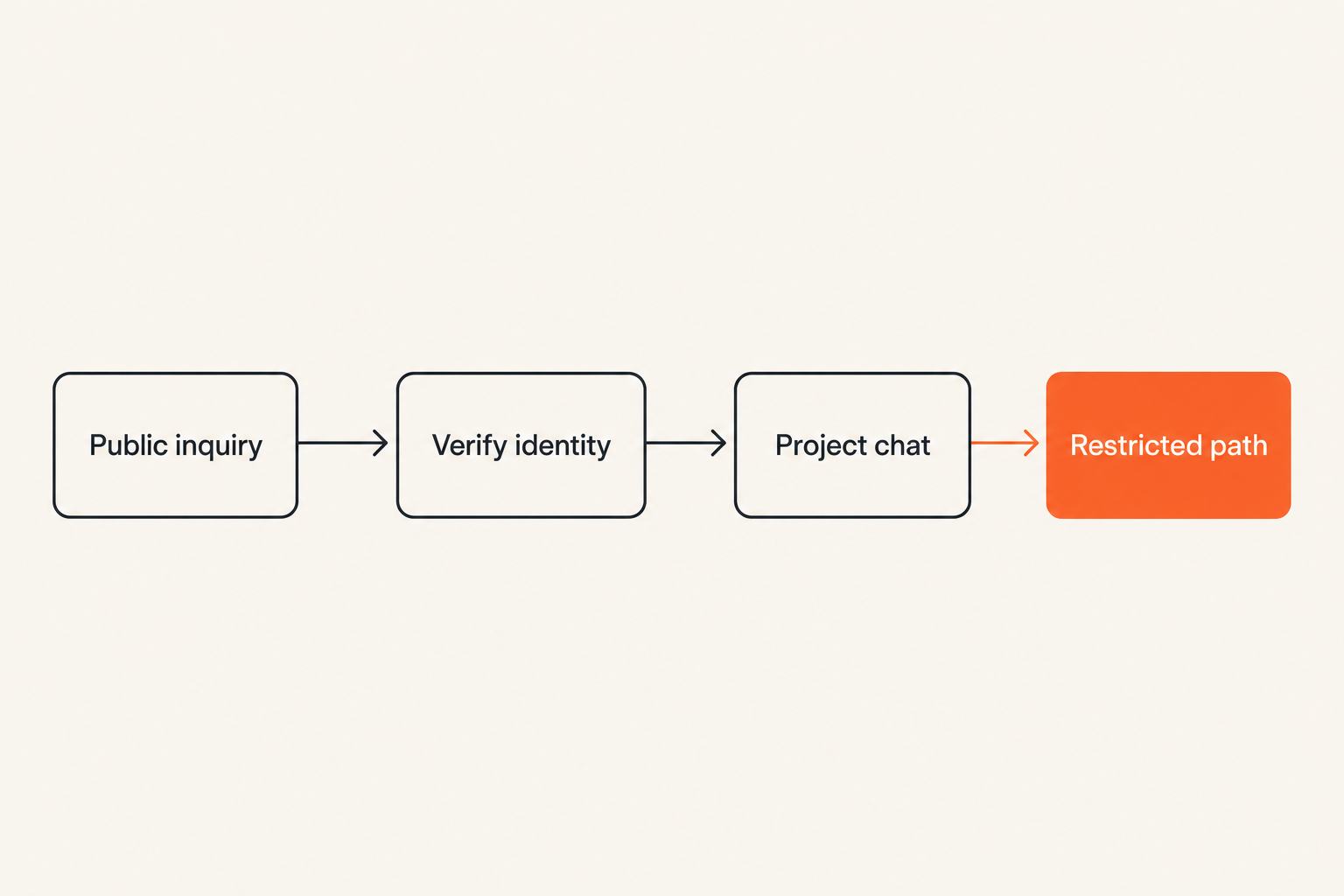
Separate discovery from delivery
Public contact details attract leads, spam, impersonation attempts, and unsolicited files. They should not automatically become the trusted channel used for active client work.
Use a simple transition:
- A public inbox or profile handles discovery.
- Identity and project legitimacy are checked.
- Active work moves into a designated encrypted channel.
- Restricted information uses a narrower path when necessary.
This separation limits how much trust is granted to anyone who knows your public username. It also makes suspicious requests easier to identify. A new account asking for production access is not treated as trusted merely because it references a real project.
Define one authoritative project channel
Clients often spread instructions across direct messages, group chats, email, and platform inboxes. Security and delivery both suffer because no one knows which message represents the approved decision.
Choose one authoritative conversation for project coordination. State who belongs there, what types of decisions are valid there, and where final deliverables or formal records live. If a client sends a material change elsewhere, move the decision back into the approved channel before acting.
A basic channel model might look like this:
Public contact: inquiries only
Project chat: coordination and routine approvals
Restricted path: credentials or highly sensitive files
System of record: contract, invoice, final acceptance
The exact tools can vary. The important point is that each path has a defined purpose.
Keep secrets out of general conversation
Encrypted messaging reduces transport exposure, but a permanent password in a busy project thread remains available to every authorized participant and every compromised endpoint that can view the history.
Passwords, recovery codes, private keys, and persistent access tokens should use a separate secret-sharing process. When temporary credentials must be communicated, scope them narrowly, set an expiration, confirm receipt, and rotate them after use.
Never mix explanation and durable secrets if you can avoid it. The chat can say what access is needed and why; a separate mechanism can carry the secret. This makes revocation and auditing much cleaner.
Create a secure client onboarding workflow
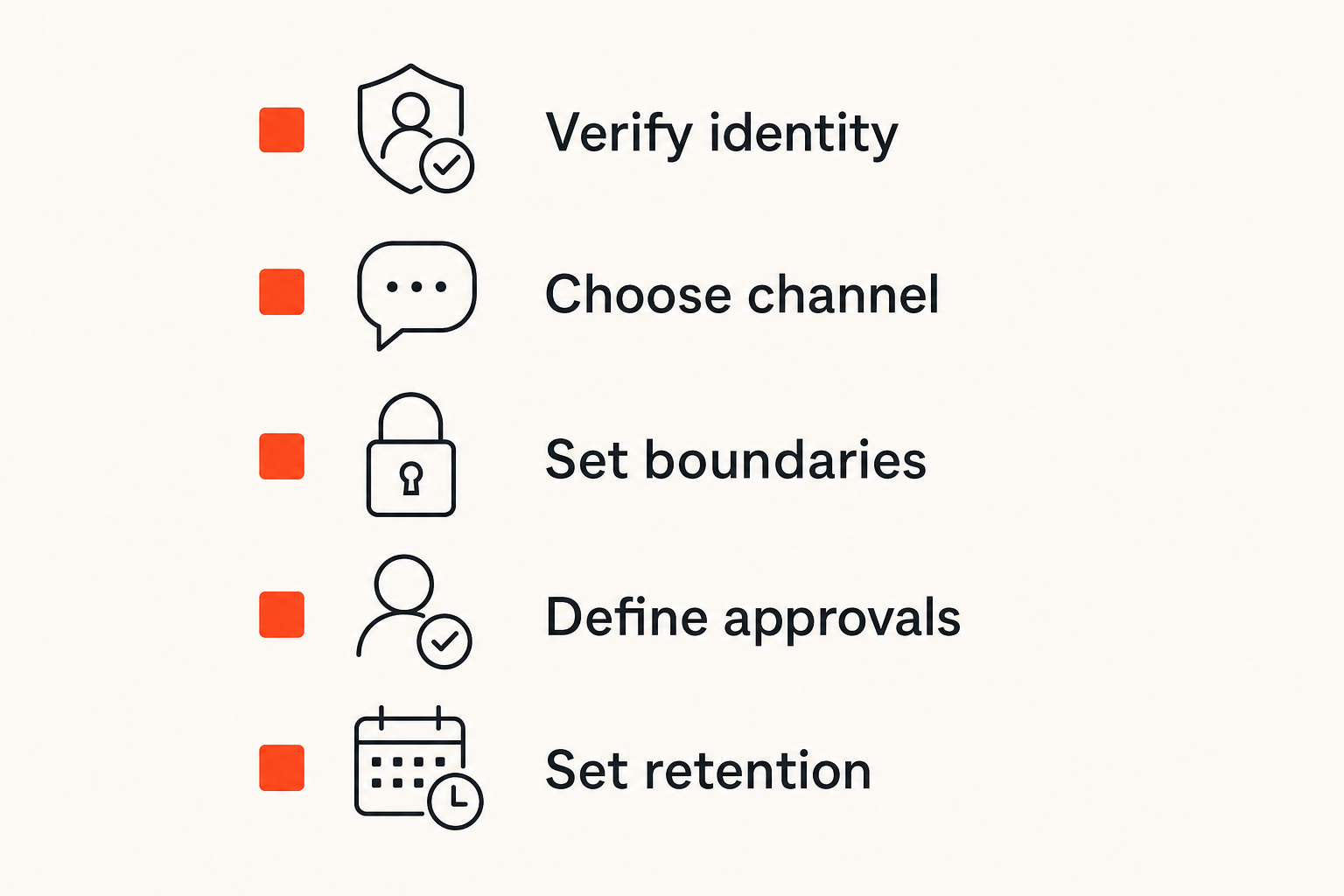
Verify identity through a second path
Encryption tells you that only the current endpoints can read a conversation. It does not always tell you that the person controlling an endpoint is the client you intended to reach.
For meaningful-risk projects, verify identity through a second path already associated with the client. This could be a brief call, a known corporate contact, an in-person confirmation, or a verification code exchanged through a previously trusted route. Do not use a second message sent to the same potentially compromised account and call it independent verification.
Repeat verification when a client suddenly changes accounts, adds a payment recipient, requests unusual access, or claims to have lost every prior device. Verification should respond to changes in risk, not become a ceremonial step performed only once.
Set communication rules at project start
Clients cannot follow boundaries they were never told about. Include a short communication policy during onboarding. It does not need legalistic language.
Cover these points:
- The approved account and project conversation
- Who may authorize scope, payments, or access
- Information that should never be sent in chat
- The route for credentials and restricted files
- Expected response times, including urgent requests
- The retention or deletion plan after completion
- How account changes will be verified
Practical rule: State the secure path before the first urgent request, because urgency is when improvised paths take over.
Record approvals without oversharing
Chat is useful for rapid approval, but endless message history is a poor system of record. Important decisions become hard to find, ambiguous reactions are mistaken for consent, and sensitive context remains attached to routine coordination.
For material approvals, summarize the decision explicitly: scope, amount, owner, date, and next action. Store the durable business record in the appropriate project system while retaining only the chat history you actually need.
This is not about duplicating everything. It is about separating conversational context from authoritative records. A clear summary reduces disputes while data minimization reduces long-term exposure.
Control files, links, and sensitive data
Minimize what enters the chat
The safest sensitive attachment is often the one never sent. Before uploading a document, ask whether the recipient needs the full file. A cropped image, redacted extract, or project identifier may be enough.
Remove hidden or unnecessary data where practical. Documents and images can include author names, comments, prior revisions, location details, timestamps, and device metadata. Encryption protects this information in transit but does not make its disclosure appropriate.
For restricted work, establish a simple rule: share the minimum content with the minimum number of people for the minimum necessary time. This is easier to enforce than trying to recover every copy later.
Treat previews and downloads as copies
A file sent through encrypted chat may be copied into local download folders, photo libraries, desktop caches, search indexes, or cloud backups. Recipients may open it in another application that keeps its own recent-file history.
The mistake teams make is thinking the attachment remains inside the messaging product. In practice, viewing can create additional storage locations outside the original encryption and deletion controls.
Review automatic download behavior on each device. Disable unnecessary saving to shared galleries, avoid opening client files in consumer applications that sync by default, and use dedicated work storage where possible. On shared or managed devices, confirm whether administrators or backup tools can access local files.
Use expiration as cleanup, not magic
Disappearing messages can reduce retained history, but they cannot retract screenshots, photographs, copied text, downloaded files, notification content, or information already captured by a compromised endpoint.
Use expiration to support a retention policy, not to promise impossible control. It works well for reducing casual accumulation and cleaning routine coordination. It works poorly as the only safeguard for information that would be damaging if copied immediately.
A defensible policy may retain active-project coordination for a limited period, move required approvals into a system of record, and delete routine chat after project closure. The policy should reflect contractual, tax, dispute, and regulatory obligations where they apply.
Secure accounts and devices
Protect the account recovery path
A strong messaging password is undermined if account recovery depends on an exposed email address, weak phone account, or reused recovery code. Attackers often target the easiest path to account control rather than the encryption itself.
Use unique credentials, strong multifactor protection where available, and recovery details that are not casually accessible. Store recovery codes away from the device they recover. Review connected sessions periodically and revoke anything you no longer recognize or use.
Also consider what a recovery event looks like to clients. If an account is lost, you need a known method to announce the change without teaching clients to trust any new profile claiming to be you.
Reduce device exposure
A secure messaging workflow inherits the security of every device that can display its content. Basic controls carry substantial weight:
- Use a strong device passcode rather than a short convenience PIN.
- Enable automatic locking with a reasonable timeout.
- Install supported operating system and application updates.
- Hide sensitive notification previews on lock screens.
- Encrypt local storage where the platform supports it.
- Remove old web sessions and unused linked devices.
- Separate work and personal profiles when feasible.
For higher-risk projects, consider a dedicated work profile or device. Separation reduces accidental sharing, keeps client downloads away from personal backup flows, and makes offboarding easier.
Plan for loss before it happens
Write down the response to a lost or compromised device before you need it. At minimum, know how to revoke messaging sessions, disable the device, contact active clients, rotate exposed credentials, and determine which project data may have been locally available.
The plan can be short:
1. Revoke the device or active session.
2. Secure email, phone, and recovery accounts.
3. Rotate client credentials accessible from the device.
4. Notify affected clients through a verified route.
5. Review downloads, notifications, and recent activity.
6. Document actions and remaining uncertainty.
Speed matters, but so does accuracy. Avoid claiming that no data was exposed when you cannot know that. Tell clients what happened, what content was potentially accessible, and what corrective actions were taken.
Set client boundaries and retention rules
Define what chat is allowed to decide
Not every message should authorize a payment change, contract amendment, or production deployment. Define which decisions can occur in chat and which require another approval step.
For example, routine creative feedback may be valid in the project conversation, while a change to banking details requires verification through a known contact. Production access might require both written authorization and a time-limited account. This protects clients and freelancers from impersonation as well as ordinary misunderstanding.
The rule should be based on consequences. A thumbs-up may be enough to choose a color. It should not be enough to reroute a large payment.
Choose a defensible retention period
Keeping everything feels safe because history can resolve disputes. Deleting everything feels private. Neither extreme works for every freelance business.
Retention should distinguish among:
- Routine coordination with little future value
- Approvals needed to demonstrate delivery or scope
- Financial records subject to business obligations
- Restricted client data that should be removed promptly
- Credentials that should be revoked rather than archived
Document the policy in plain language and apply it consistently. If a client contract requires a different period, record that exception. Consistency matters because selective deletion after a dispute begins may create legal and trust problems.
Practical rule: Retain records because there is a defined business or legal reason, not because deletion was never scheduled.
Close projects deliberately
Project completion is a security event. Access that was reasonable during delivery may become unnecessary immediately afterward.
A closure checklist should confirm that final work was accepted, credentials were rotated or revoked, temporary accounts were removed, shared groups were closed or cleaned up, local restricted files were deleted where appropriate, and required records were moved to the correct archive.
Tell the client what was retained and what was removed. This provides a clean boundary if the relationship restarts later. A returning client should not automatically regain every old permission merely because the conversation still exists.
Understand what breaks in practice
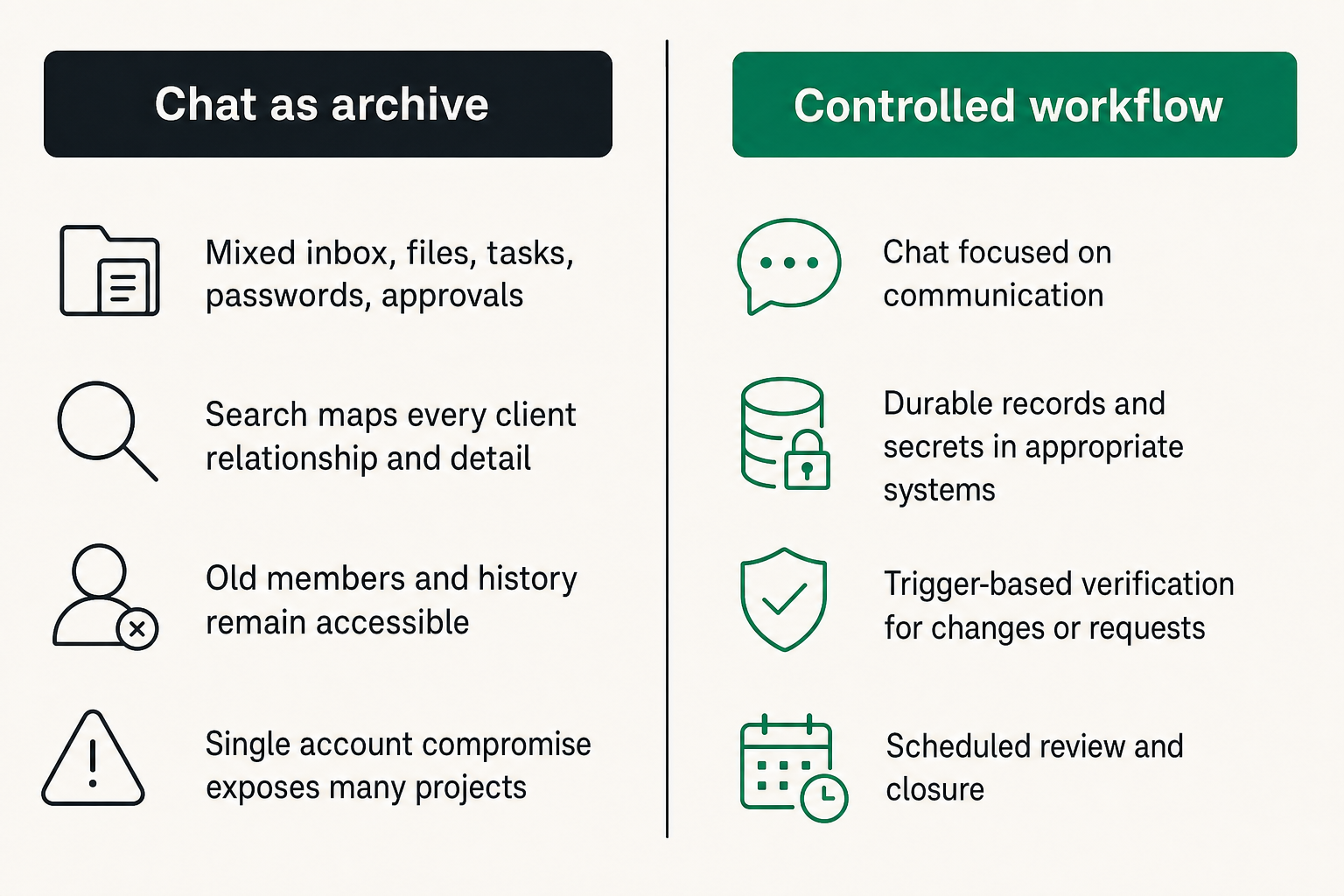
Encrypted chat becomes an unstructured archive
What breaks in practice is not usually the encryption algorithm. It is the accumulation of years of searchable client history on active devices. A single account compromise then exposes many unrelated projects at once.
The failure begins when messaging is used simultaneously as an inbox, file store, task manager, password vault, approval system, and permanent archive. Search feels convenient until it becomes a map of every client relationship and sensitive detail.
What works is assigning durable records and secrets to appropriate systems while keeping chat focused on communication. What fails is assuming an encrypted archive has no cost simply because unauthorized network observers cannot read it.
Identity is assumed instead of verified
Freelancers often recognize clients by display name, profile image, or writing style. Those are weak identity signals. Account takeovers and impersonation become especially dangerous when a message requests urgency, secrecy, new payment details, credential access, or a change in the usual process.
Build trigger-based verification into the workflow. You do not need to challenge every routine message. You do need to pause when the account, request, recipient, or consequence changes.
A useful test is: if this instruction were fraudulent, could it create irreversible harm? If yes, confirm it independently before acting.
Backups and notifications leak context
A message body may be encrypted in transit while its content appears in a lock-screen preview, smartwatch alert, desktop notification, screenshot, system backup, or copied clipboard. Even sender names and timing can reveal client relationships.
Review the entire display and storage path. Hide previews for sensitive conversations, avoid mirroring work notifications to unnecessary devices, clear shared clipboards, and understand whether backups include message databases or downloaded attachments.
This is where product claims and operational reality diverge. Encryption can be functioning correctly while the user workflow still exposes meaningful information.
Implement the workflow without slowing work
Use a seven-step rollout
Do not attempt to redesign every client process in one afternoon. Start with the highest-risk communication paths and build repeatable defaults.
- Inventory channels. List every app, inbox, device, and linked session currently used for client messages.
- Classify work. Identify routine, confidential, and restricted project types.
- Assign channel purposes. Separate inquiries, active coordination, restricted exchange, and durable records.
- Harden accounts. Improve credentials, recovery settings, device locks, notifications, and session review.
- Write client rules. Create a short onboarding note covering approved identities, sensitive data, and urgent requests.
- Move active projects. Transition clients deliberately rather than maintaining duplicate authoritative chats.
- Schedule closure. Add retention review and access removal to every project completion workflow.
The system should reduce decisions during busy work. If every message requires a fresh security analysis, people will route around the process.
Create reusable message templates
Templates make secure behavior faster than improvisation. Useful examples include:
Channel transition
For project work, please use this verified conversation. I will not request passwords or payment changes through an unverified account.
Sensitive-data boundary
Please do not send permanent credentials in this thread. I will provide the approved method for temporary access.
Unexpected account change
Before acting on this request, I need to verify the account change through our previously established contact path.
Project closure
The project is complete. Temporary access will be removed, restricted local files will be deleted as agreed, and required business records will be retained under our stated policy.
Templates should sound normal, not alarming. The goal is to make boundaries predictable for legitimate clients while increasing resistance to manipulation.
Test the awkward edge cases
A workflow is not finished until it handles inconvenient situations. Test what happens when a client loses a device, adds an assistant, travels across time zones, sends a large file, requests emergency access, disputes an approval, or returns after a year.
Also test your own recovery. Can you regain access without weakening security? Can you identify all linked devices? Can you notify clients if your account changes? Can you close one project without deleting records required for another?
These exercises expose hidden dependencies. A secure process that works only when every device and participant behaves normally is not resilient enough for freelance operations.
Choose tools by operational fit
Evaluate workflow capabilities
Tool selection should begin after defining the workflow. Evaluate whether a messaging service supports the operational controls your work requires, including:
- Clear encryption and privacy behavior
- Reliable participant and device verification
- Manageable group membership
- Session visibility and revocation
- Useful expiration and deletion controls
- Notification privacy
- Practical account recovery
- Simple use across the devices you genuinely need
- Minimal unnecessary identity or profile exposure
Do not select purely from feature count. A product with many controls can fail if clients cannot understand it or if recovery is so fragile that users bypass it. Conversely, convenience should not obscure who can access messages or how long data persists.
Measure whether the system works
Freelancing encrypted messaging does not need an enterprise dashboard, but a few operational checks reveal whether the design is holding:
- Number of active channels per client
- Unrecognized or unused linked sessions
- Projects missing a verified client identity
- Temporary credentials not yet revoked
- Completed projects awaiting closure
- Restricted files remaining in download folders
- Exceptions to the normal communication policy
Review these at a sensible interval and after major account or device changes. The objective is not perfect compliance reporting. It is finding security drift before an incident or client dispute exposes it.
The strongest signal is whether the secure path remains the easiest legitimate path. If clients and freelancers repeatedly bypass it, investigate the workflow rather than merely restating the rule.
Try qrypt.chat
Freelancers need private communication that supports real work without pretending the chat window is the whole security system. qrypt.chat is built for people who care about encrypted messaging, practical privacy, and clearer communication boundaries.
Use it as part of a deliberate architecture: verify who is present, minimize sensitive data, secure endpoints, define retention, and close access when the work ends. That is what turns freelancing encrypted messaging from a feature claim into a dependable client workflow.
Try qrypt.chat
Private messaging for people and teams that want practical communication security. Try qrypt.chat.