A client sends production credentials in a chat thread. Another sends a contract from a personal account you cannot verify. Six months later, the project is over, but confidential files, access links, and message history remain scattered across three devices.
This is the everyday problem behind freelancing encrypted messaging. Freelancers often handle sensitive material without the security staff, managed hardware, or formal processes available to larger organizations. At the same time, clients expect communication to remain fast and convenient.
Teams think the problem is choosing an encrypted chat app. The real problem is designing a communication workflow that controls identity, devices, files, metadata, retention, and recovery from first contact through project closure.
That changes the conversation. The practical question is not simply whether a message is encrypted. It is whether the entire working relationship remains private, understandable, and recoverable when something goes wrong.
Table of contents
- Why freelancing encrypted messaging is a workflow problem
- Define what actually needs protection
- Choose an encrypted messaging architecture
- Build a secure client onboarding workflow
- Secure devices, accounts, and notifications
- Handle files, credentials, and sensitive links
- Manage groups, collaborators, and client teams
- Plan retention, recovery, and project closure
- Common encrypted messaging failure modes
- Turn private chat into an operating standard
Why freelancing encrypted messaging is a workflow problem
Encryption does not secure the whole engagement
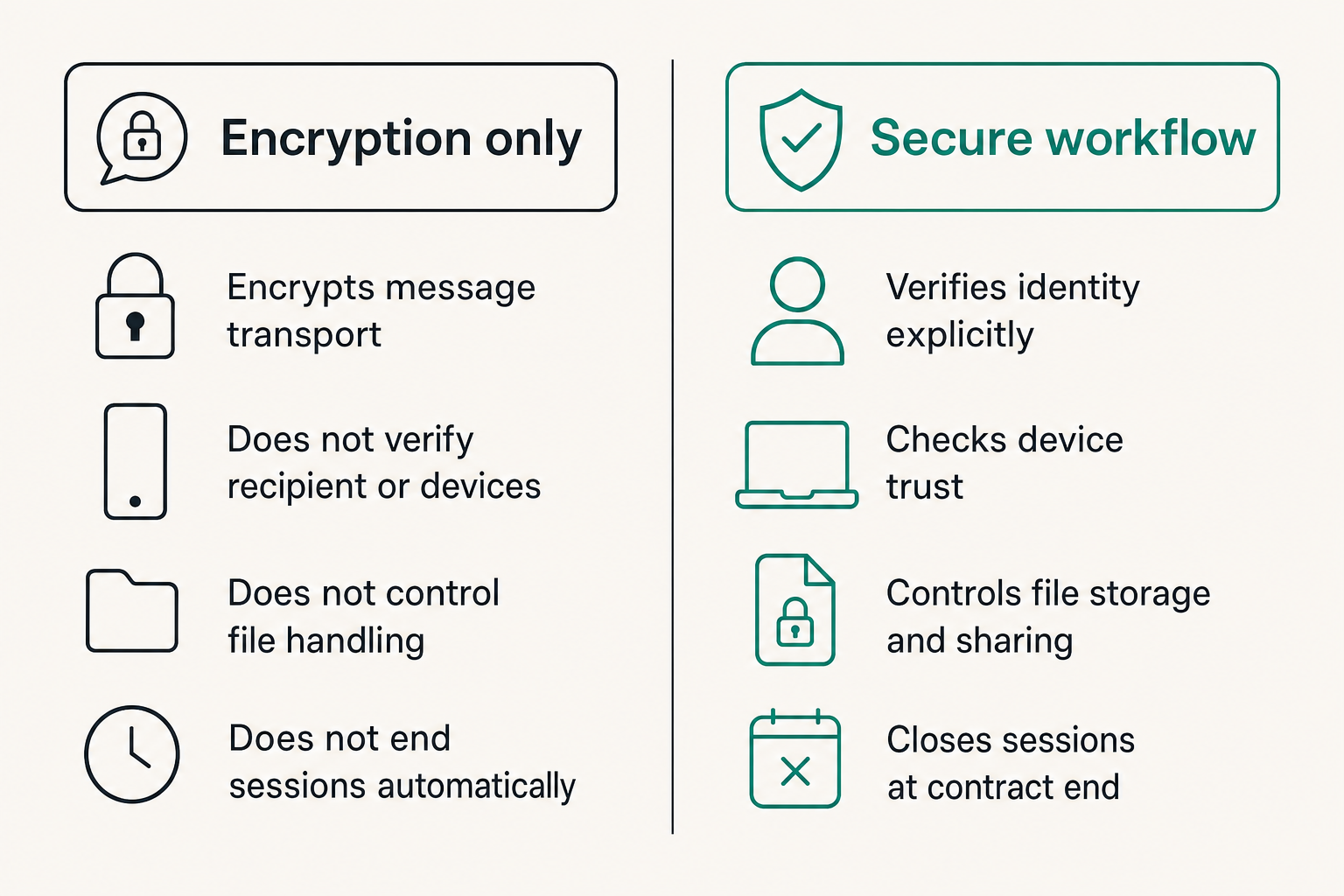
End-to-end encryption can prevent an intermediary from reading message content while it travels between participants. That is important, but it does not answer several operational questions:
- Was the recipient really the intended client?
- Is either device compromised or shared?
- Does the service expose phone numbers, contact graphs, or account identifiers?
- Were files downloaded into an unencrypted folder?
- Can a stolen session remain active indefinitely?
- What happens to sensitive history after the contract ends?
A message becomes plaintext at the endpoints because people need to read it. Screenshots, notification previews, exports, backups, browser sessions, and copied text can all bypass the protection applied during transport.
The mistake teams make is treating encryption as a property of the conversation rather than one control inside a larger system. Strong cryptography cannot repair weak identity checks, careless file handling, or a forgotten laptop session.
Practical rule: Assume encryption protects message transport and storage only as documented. Design separate controls for identity, endpoints, files, and human behavior.
Freelancers have unusual trust boundaries
An employee usually works within one organization's identity system. A freelancer may switch between several client environments in the same afternoon. Each client can have different tools, retention requirements, security maturity, and expectations about who may join a conversation.
That creates overlapping trust boundaries. Your laptop may contain conversations from competing companies. Your personal identity may be tied to work accounts. A subcontractor may need access to one narrow discussion but not the full client history.
For those of us who study how independent professionals actually organize tools and client work, including the team at ugig.net, the recurring lesson is that security must fit a fragmented operating environment. A policy that assumes one employer, one device fleet, and one administrator will not survive normal freelance work.
A useful way to think about it is that each client engagement should be a small security domain. It needs a known membership list, approved channels, defined information boundaries, and a clean exit procedure.
Define what actually needs protection
Classify conversations by consequence
Not every message needs the same handling. Scheduling a public webinar is different from sending an unreleased product roadmap or production recovery key. If every conversation receives maximum controls, clients may route around the process. If everything is treated casually, one mistake can expose the engagement.
Use a simple classification model:
| Conversation level | Typical content | Recommended handling |
|---|---|---|
| Routine | Scheduling, public links, general status | Approved account and normal encrypted chat |
| Confidential | Contracts, drafts, private strategy | Verified participants, protected devices, limited retention |
| Restricted | Credentials, personal data, incident details | Separate secret transfer, explicit verification, rapid deletion |
The labels matter less than shared expectations. A two-person design project may only need routine and confidential categories. A security consultant handling breach evidence may require tighter distinctions.
The practical question is what would happen if the content reached the wrong person, remained available for years, or became visible on a locked screen. The answer determines the control.
Treat metadata as part of the risk
Message content is not the only useful information. Communication metadata can reveal who spoke, when they spoke, which device was used, how frequently participants communicated, and sometimes where they connected from.
For a freelancer, those details can expose client relationships, work patterns, travel, or collaboration networks. A confidential acquisition project may be sensitive even if an observer cannot read a single message.
When evaluating a service, ask what identifiers are required, which metadata the provider retains, whether contact discovery uploads an address book, and whether membership information is exposed. Also check how web clients, link previews, abuse controls, and push notification services affect data flow.
Perfect metadata privacy is difficult, and broad claims should be treated skeptically. The objective is informed minimization: disclose only what the engagement needs and avoid linking unrelated client contexts unnecessarily.
Practical rule: If the relationship itself is sensitive, evaluate account identifiers and metadata collection as carefully as message encryption.
Choose an encrypted messaging architecture
Evaluate the system, not the feature list
A secure messenger should be evaluated as an architecture. Start with its encryption model, but continue through identity, device enrollment, session management, data storage, recovery, and deletion.
Useful questions include:
- Is content end-to-end encrypted by default for the relevant conversation type?
- How are participant identities or device keys verified?
- Can users review and revoke active devices?
- What happens when a participant adds a new device?
- Are backups encrypted, optional, or outside the protected model?
- Can administrators or workspace owners access content?
- How are disappearing messages and attachment deletion implemented?
- Does the browser client expand the attack surface?
Do not assume that a lock icon answers these questions. Products may use encryption for network transport while retaining server-side access to plaintext. Others may encrypt direct conversations differently from group chats, bots, backups, or imported history.
Documentation quality is itself an operational signal. If you cannot explain the trust model to a client in a few sentences, you will struggle to define safe usage.
Match the channel to the client
A theoretically strong tool is not useful if a client refuses to install it, loses access repeatedly, or copies every message into email. Channel selection has to account for participant capability and engagement risk.
For low-risk coordination, the client's existing approved system may be sufficient. For confidential strategy, use a mutually approved encrypted channel with verified accounts. For highly sensitive material, combine encrypted messaging with a dedicated credential or file-transfer method rather than forcing chat to do everything.
Avoid silently moving a client into a new platform. Explain what the channel is for, what must not be sent there, and how both parties will recover access. This is especially important when clients have regulatory, discovery, or record-retention obligations.
The goal is not one universal messenger. It is a small, deliberate channel set with clear purposes. Fewer channels reduce ambiguity, but each channel still needs an owner and a rule.
Build a secure client onboarding workflow
Verify identity before sharing access
The beginning of an engagement is when impersonation is easiest. You may know a client only through a marketplace account, email address, or video call. Attackers exploit that uncertainty by sending replacement payment details, malicious files, or requests for credentials.
Use an independent signal before exchanging sensitive material. For example, confirm a new encrypted-chat identity during an already scheduled video call, through a known marketplace account, or by comparing a verification code over a second established channel.
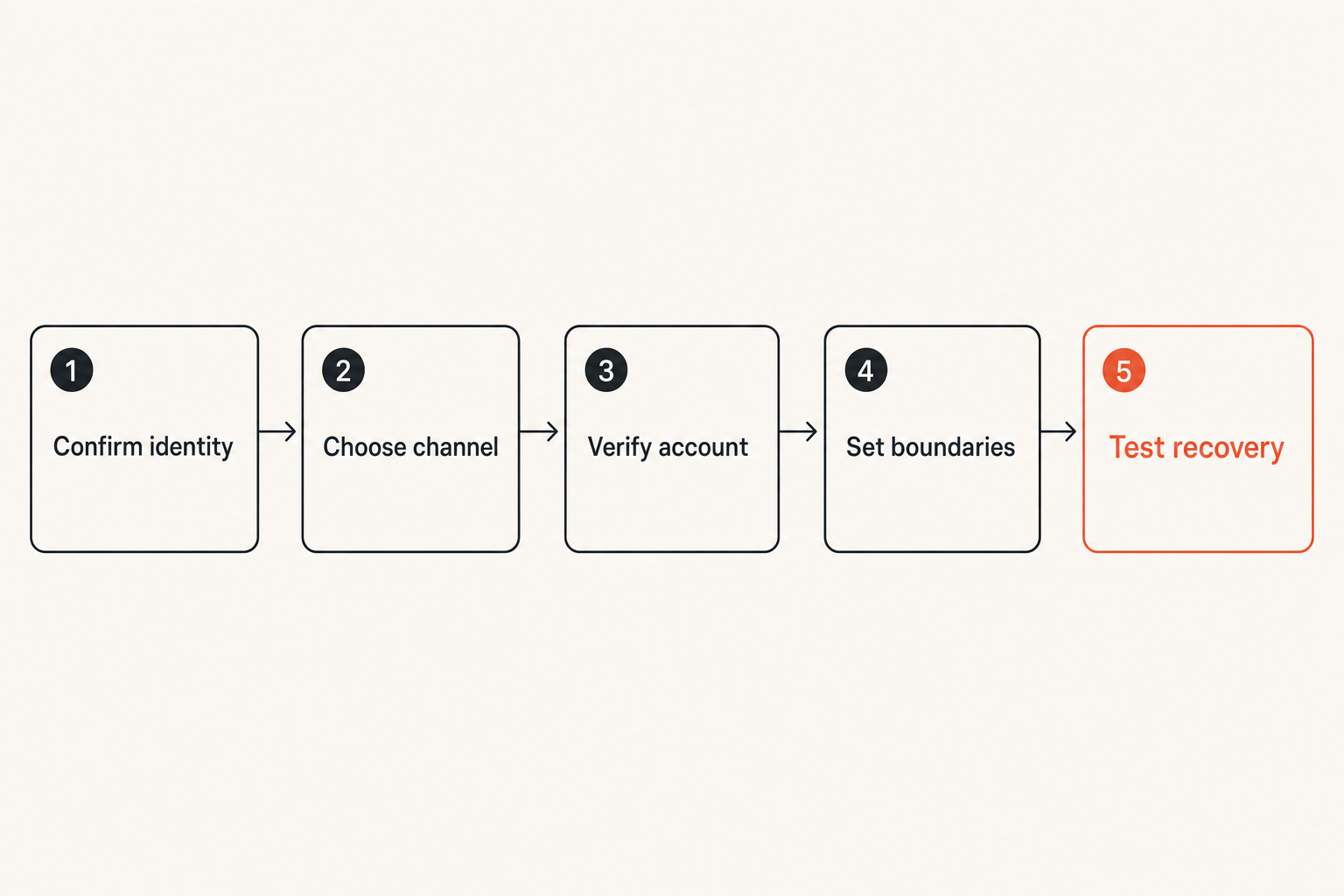
A practical onboarding sequence looks like this:
- Establish the commercial identity. Confirm the legal or marketplace identity attached to the contract and payment arrangement.
- Select the communication channel. Agree which system will carry routine and confidential discussion.
- Verify the participant. Confirm the account or device identity through an independent channel.
- Record the boundary. State who may join, what content belongs in chat, and where secrets must go.
- Test recovery. Make sure both parties understand how access is restored or a lost device is revoked.
- Begin sensitive exchange. Share confidential material only after the earlier steps are complete.
Verification need not become ceremonial. A short check at the right moment prevents a long investigation later.
Set communication rules at project start
Security rules work when they are specific. Telling a client to communicate securely leaves too much room for interpretation. A short communication note in the kickoff document is more useful.
It can define:
- The approved chat account or workspace
- The authoritative channel for scope changes
- A ban on sending passwords or seed phrases in normal chat
- Expected response windows so urgency cannot be easily abused
- Who is authorized to approve payments or access changes
- How identity will be rechecked after account or device changes
- How messages and attachments will be handled at project closure
This also reduces business disputes. Encrypted chat may be private, but it is not automatically the correct system of record for approvals, invoices, or contractual changes. Decide which decisions must also appear in a signed document, ticket, or other durable record.
Practical rule: Define the authority of each channel. Privacy does not make an informal message contractually complete or operationally authoritative.
Secure devices, accounts, and notifications
Protect the endpoints that reveal plaintext
What breaks in practice is usually an endpoint, not the encryption algorithm. A strong messaging protocol offers little protection when the phone has no screen lock, the laptop is infected, or a browser session remains open on a shared computer.
At minimum, freelance devices used for confidential chat should have:
- Current operating system and application updates
- Full-disk encryption
- A strong device passcode and short automatic lock period
- Separate user accounts when a device is shared
- A password manager for unique account credentials
- Multi-factor authentication where the service supports it
- A documented list of active messaging devices and sessions
- Remote lock or wipe capability where appropriate
Be cautious with browser-based messaging on unmanaged machines. Browser extensions, downloaded files, cached content, and persistent sessions create additional exposure. If you must use a temporary device, avoid downloading attachments, sign out explicitly, and revoke the session afterward from a trusted device.
Device security does not need to be enterprise-grade to be disciplined. The main objective is eliminating avoidable, persistent access.
Reduce notification and account leakage
Notification previews can reveal client names, message fragments, verification codes, and incident details before the device is unlocked. This matters in coworking spaces, airports, shared homes, and screen-shared meetings.
Configure sensitive apps to hide message content on the lock screen. Review wearable devices too; a protected phone does not help if the full message appears on a watch. During calls, share a single window instead of the entire desktop and disable pop-up banners when discussing confidential material.
Account identifiers deserve similar attention. Using one public phone number or handle across personal life and every client can make relationships easier to correlate. Where the service and client workflow permit it, separate professional identifiers from personal ones and avoid unnecessary address-book synchronization.
The mistake teams make is optimizing initial setup while ignoring repeated exposure. Notifications happen dozens of times a day. Small leaks compound.
Handle files, credentials, and sensitive links
Separate discussion from secret delivery
Encrypted messaging is useful for discussing access, but it is not always the right place to deliver the access secret itself. Chat history is searchable, synchronized, and frequently available on multiple devices. A credential pasted once may remain usable long after the conversation ends.
Use a dedicated secret-sharing or credential-management workflow when possible. Send the contextual instruction in chat, deliver the secret through the approved protected mechanism, and require rotation or expiration. Avoid sending a username, password, and system URL together in one persistent thread.
For example, instead of writing, “Here is the production login,” use chat to say that access has been granted through the client's password manager and identify the expected role. The client can then confirm receipt without reproducing the secret.
Be especially strict with private keys, recovery codes, authentication seeds, cryptocurrency seed phrases, and identity documents. Some material should never enter ordinary chat, even when the channel is encrypted.
Control downloads and local copies
Attachments cross boundaries. A confidential file may leave an encrypted conversation and land in a downloads folder, cloud backup, thumbnail cache, recent-files list, or collaboration application. Deleting the message does not necessarily delete those copies.
Before downloading sensitive material, decide where it should live. Use an encrypted project folder, give files non-revealing names where appropriate, and remove local copies when the task is complete. Do not casually re-upload client files into AI tools, conversion services, or personal cloud storage; those actions introduce new processors and retention policies.
For deliverables, distinguish working files from final records. Working files can often be deleted after acceptance. Final invoices, signed agreements, or required tax records may need retention outside the messenger under a separate business policy.
A useful way to think about it is that chat is a transfer surface, not a document repository. If a file matters beyond the conversation, move it deliberately into an approved system with access control and retention rules.
Manage groups, collaborators, and client teams
Make membership changes visible
Group encryption does not solve group governance. Every participant is an endpoint, and every newly added device or member changes the exposure of the conversation.
For project groups, keep the participant list small and role-based. Confirm additions before sensitive discussion continues. Remove former employees, subcontractors, and client stakeholders when their involvement ends. If the platform displays security-code or device changes, treat unexpected changes as a reason to pause and verify rather than as routine noise.
This is particularly important during incidents or disputes, when people may create side groups quickly. Multiple nearly identical groups make it easy to send evidence or private commentary to the wrong audience.
Assign one person to own membership, even in a small engagement. Ownership can be as simple as the freelancer checking participants at kickoff, after staffing changes, and before sharing restricted material.
Keep project contexts separated
Combining clients into a single general workspace may feel efficient, but it increases the blast radius of a mistaken message, search, export, or account compromise. Separation also matters when clients are competitors or when contractual confidentiality requirements differ.
Use clearly named project spaces without placing sensitive client details in publicly visible titles. Keep direct messages for limited one-to-one matters, but do not let them become hidden repositories for decisions the project team needs. When a subcontractor joins, give access only to the project and period required.
Separate contexts also help with closure. You can archive or remove one engagement without disrupting another. If the platform lacks adequate workspace boundaries, compensate with separate accounts or choose a better-suited channel for high-risk projects.
Practical rule: Design groups for least access, not maximum convenience. Every participant should have a current reason to see the conversation.
Plan retention, recovery, and project closure
Retain less without losing business records
Keeping every message forever feels safe until an account is compromised, a device is searched, or a client asks what data remains. Unlimited history increases exposure and makes important decisions harder to locate.
Disappearing messages can reduce residual data, but they are not a guarantee. Participants can copy, photograph, export, or otherwise retain content. Timers may also conflict with legal, contractual, insurance, or accounting obligations.
Use retention based on content type. Routine coordination can often expire quickly. Confidential working discussion may remain for the active project plus a short closure period. Required business records should be extracted into an appropriate records system rather than preserved accidentally inside chat.
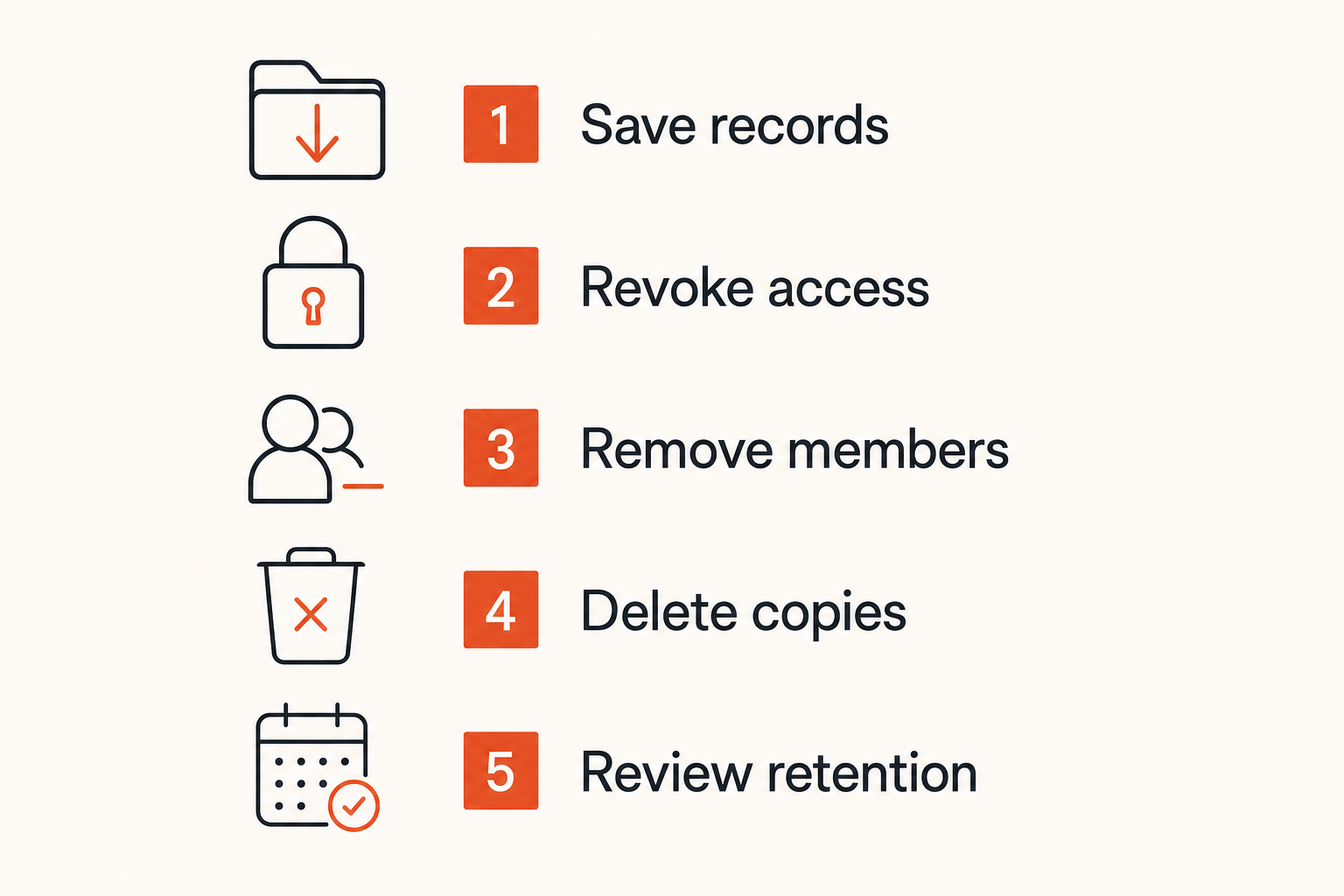
At project end, follow a consistent closeout:
- Confirm deliverable acceptance and outstanding obligations.
- Move required approvals and records into their designated systems.
- Revoke project credentials, shared links, and temporary access.
- Remove collaborators who no longer need membership.
- Delete unneeded local files and message history where feasible.
- Record what must remain, where it is stored, and when it will be reviewed.
Deletion claims should remain modest. You can control your devices and accounts; you cannot always prove that another participant retained no copy.
Design recovery before a device is lost
Recovery is a security function, not an administrative afterthought. Weak recovery can let an attacker bypass strong authentication. No recovery plan can also lock a freelancer out during a time-sensitive client incident.
Understand whether recovery depends on a phone number, email account, recovery phrase, trusted device, administrator, or encrypted backup. Protect those recovery paths at least as strongly as the messaging account. Store recovery codes offline or in a protected password manager, not in the same chat account they recover.
Run a tabletop exercise: imagine your primary phone is stolen while traveling. How do you revoke it? Can you contact the client without relying on that device? Can you identify active sessions? Will message history restore, and should it?
The answers expose hidden dependencies. If every recovery action relies on one email inbox or phone number, that account becomes a high-value single point of failure.
Common encrypted messaging failure modes
What fails in practice
Most freelancing encrypted messaging failures are ordinary workflow errors rather than attacks on cryptography. Common examples include:
- Choosing a tool solely because it advertises encryption
- Verifying a username through the same potentially compromised channel
- Sending credentials directly beside system links
- Leaving notification previews enabled during travel or screen sharing
- Using a shared family device for client conversations
- Allowing groups to accumulate former participants
- Assuming disappearing messages prevent screenshots or exports
- Treating chat as the only record of approvals and scope changes
- Keeping every project indefinitely because deletion feels risky
- Losing recovery material or storing it inside the recovered account
Another failure is tool sprawl. When each client conversation exists across email, several messengers, social direct messages, and project platforms, nobody knows which channel is authoritative. Security notices are missed, files become duplicated, and offboarding becomes incomplete.
What breaks in practice is ambiguity: ambiguity about identity, channel purpose, membership, file location, and retention.
What works instead
A workable model is intentionally small. Use one default private communication channel, allow documented exceptions for client requirements, and maintain a separate method for secrets or controlled files. Add stronger verification when the consequence of impersonation is high.
The contrast is straightforward:
| Fragile approach | Operational approach |
|---|---|
| Trust the display name | Verify identity independently |
| Put everything in chat | Separate chat, secrets, and records |
| Keep all history | Apply content-based retention |
| Add people informally | Assign membership ownership |
| Recover when disaster happens | Test revocation and recovery early |
| Assume encryption solves leakage | Secure endpoints and notifications |
Do not add controls merely because they sound advanced. Hardware-backed authentication is useful only if account recovery does not bypass it casually. Disappearing messages help only if required records are stored elsewhere. Separate accounts help only if the operator can maintain them without confusing clients.
The best workflow is one that remains understandable during a deadline, device loss, staffing change, or payment dispute.
Turn private chat into an operating standard
Use a lightweight implementation checklist
Freelancers do not need a 40-page security policy. They need a repeatable standard that can be applied to every new engagement. Start with this checklist:
- Choose a default encrypted channel and document its trust model.
- Define routine, confidential, and restricted content.
- Verify new client identities before sensitive exchange.
- Protect every authorized device and review active sessions.
- Hide sensitive notification previews.
- Keep credentials and recovery material out of ordinary chat.
- Separate client spaces and control group membership.
- Decide which records must live outside the messenger.
- Set retention expectations at kickoff.
- Close projects by revoking access and deleting unnecessary data.
- Test account recovery before relying on the channel.
Review the standard when your work changes. A freelance writer handling unpublished drafts has different exposure from a developer with production access or an investigator receiving source material. The controls should follow the consequence, not the job title.
Private communication is also a client-service issue. A clear workflow reduces accidental disclosure, prevents confusion over authoritative instructions, and makes transitions easier. You do not need to promise perfect secrecy. You need to explain the boundary honestly and operate it consistently.
Freelancing encrypted messaging works when encryption is supported by identity verification, endpoint protection, controlled file handling, limited retention, and deliberate closure. The app matters, but the operating model determines whether privacy survives real work.
Try qrypt.chat
For private conversations built around practical encrypted communication, Try qrypt.chat.