VA secure messaging sounds simple until someone has to operate it.
A patient sends a sensitive question. A remote staff member opens it on a personal laptop. A supervisor needs context. A notification fires on a lock screen. A record needs to be retained, but not overexposed. Nobody wants to be the person who turned a privacy feature into a metadata leak.
Teams think the problem is encrypted messages. The real problem is controlled communication across people, devices, identities, retention rules, and operational handoffs.
That changes the conversation. The practical question is not “which app has encryption?” It is “can this messaging workflow protect private content while still letting real teams respond, escalate, audit, and recover?” In 2026, VA secure messaging is an architecture decision, not a feature checkbox.
Table of contents
- What VA secure messaging really has to handle
- VA secure messaging threat model in 2026
- Identity and access are the first control plane
- Device security and endpoint trust
- Message lifecycle design: send, store, expire, prove
- Operational workflow for VA secure messaging
- What works and what fails
- Metrics that show secure messaging is working
- Integration patterns for remote teams and regulated groups
- Product fit: when qrypt.chat belongs in the architecture
What VA secure messaging really has to handle
The message is only one object
A useful way to think about VA secure messaging is to stop looking at the text box first. The message body matters, but it is only one object in a larger system.
A real secure messaging workflow includes:
- The sender identity
- The recipient identity or team queue
- Device state
- Authentication strength
- Message content
- Attachments
- Timestamps
- Delivery status
- Read status
- Routing decisions
- Escalation history
- Retention state
- Audit events
- Support actions
The mistake teams make is treating encryption as if it automatically secures all of that. It does not. Encryption protects content under specific conditions. It does not decide whether the right person received the message, whether the device is trustworthy, whether a push notification exposed the subject line, or whether an export created a second copy outside the secure boundary.
For privacy-conscious users, this is familiar. The app can claim strong encryption while still leaking useful context through contact discovery, previews, cloud backups, analytics, or weak account recovery. For security professionals and remote teams, the same issue appears at organizational scale: the message is private, but the workflow around it is loose.
Privacy fails at workflow edges
Most failures happen at the edges:
- A message is copied into email for convenience.
- A screenshot is taken because the system has no clean handoff process.
- A user leaves the organization but keeps an active session.
- A phone replacement turns into an account recovery shortcut.
- A notification reveals too much on a locked device.
- A supervisor is added to a conversation without a clear audit trail.
None of these are exotic cryptographic failures. They are operating failures. That is why secure messaging has to be designed as a workflow, not just selected as an app.
Practical rule: If users must leave the secure channel to finish the job, the secure channel is not the workflow. It is only a temporary container.
The decision is architectural
For VA-style environments, healthcare-adjacent teams, veterans’ services groups, legal support teams, and remote operators handling sensitive information, the architecture needs to answer four questions:
- Who is allowed to communicate?
- Which devices are trusted enough to participate?
- What information is retained, deleted, or exported?
- How does work move without leaking content?
That changes vendor evaluation. You are not buying “chat.” You are deciding how private communication fits into identity, endpoint security, support, compliance, and day-to-day operations.
If you want a deeper adjacent overview, our earlier post on VA secure messaging architecture in 2026 covers the same theme from a broader planning angle. This article goes more operator-level: what breaks, what to implement, and how to avoid security theater.
VA secure messaging threat model in 2026
Who can see what
The first threat model question is blunt: who can see what?
Not “is it encrypted?” Not “is the app secure?” Who can see the content, metadata, attachment names, routing labels, user list, device list, audit events, and recovery events?
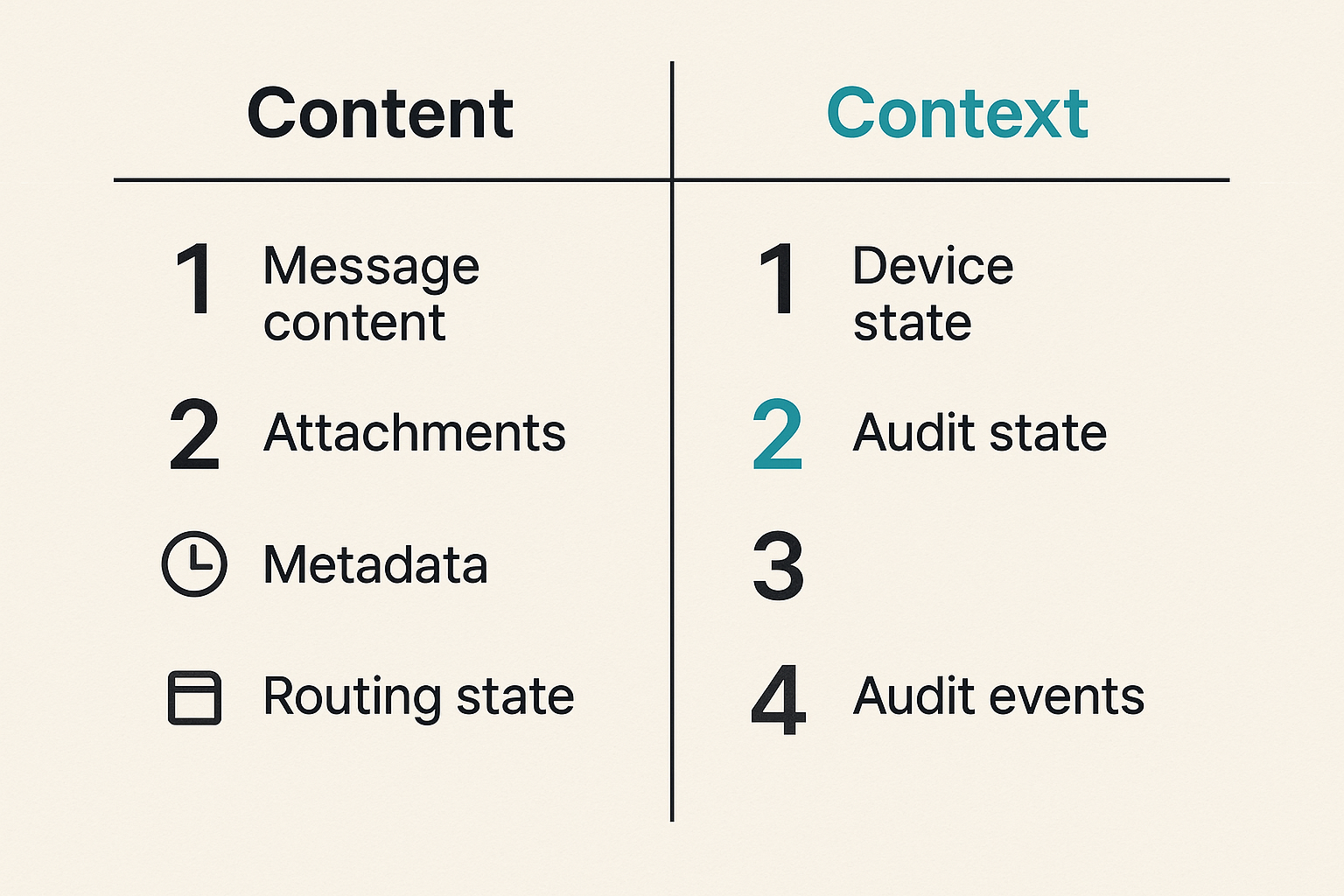
For a VA secure messaging workflow, visibility usually falls into layers:
| Layer | Example data | Primary risk |
|---|---|---|
| Message content | Symptoms, case notes, personal details | Direct disclosure |
| Attachments | PDFs, images, forms | Persistent sensitive copies |
| Metadata | Sender, recipient, time, frequency | Behavioral inference |
| Routing state | Queue, department, assigned staff | Sensitive context exposure |
| Device state | Active sessions, device names | Account takeover path |
| Audit state | Access logs, admin actions | Insider misuse or overcollection |
What breaks in practice is that teams protect the first row and ignore the rest. But metadata can be enough to reveal a pattern. A message to a specialist, a late-night exchange, repeated contact with a case worker, or an escalation to a sensitive queue can all carry meaning.
Metadata is operational data
Metadata is not automatically bad. In fact, operations need some of it. You need delivery status, abuse controls, rate limits, support diagnostics, and basic auditability. The problem is collecting more than you need, storing it longer than necessary, or exposing it to roles that do not need it.
A secure design separates metadata into categories:
- Required for message delivery
- Required for user-facing status
- Required for security monitoring
- Required for compliance or retention
- Useful but not necessary
- Dangerous if exposed
The last two categories are where teams should be skeptical. “Useful” data has a way of becoming permanent data. Permanent data becomes discoverable, breachable, exportable, and administratively tempting.
When evaluating privacy posture, read the product’s public policies and technical claims together. A privacy statement should match the system design. For example, qrypt.chat publishes its approach to data handling on the qrypt.chat privacy page, which is the right kind of document to compare against your own retention and metadata requirements.
Practical rule: Treat metadata as sensitive until you have a specific operational reason not to.
Post-quantum planning without theater
In 2026, post-quantum cryptography is a serious planning topic, but it is also easy to misuse as marketing fog. The practical question is not whether a product says “quantum” somewhere. The practical question is whether the cryptographic choices make sense for your threat model and whether the rest of the system is disciplined enough to benefit from them.
For long-lived sensitive communication, harvest-now-decrypt-later risk matters. If an adversary can capture encrypted traffic today and decrypt it later, content with long-term sensitivity deserves better protection. That is especially relevant for medical, legal, identity, personal safety, and government-adjacent communication.
But post-quantum encryption does not fix weak devices, sloppy recovery, overbroad admin access, or screenshots. It is one layer. It belongs in the architecture, not above it as a slogan.
For teams comparing cryptographic posture, qrypt.chat summarizes its secure messaging direction on the qrypt.chat security page. Use that kind of information as an input to architecture review, not as a substitute for one.
Identity and access are the first control plane
User identity is not device identity
A user account and a device are different control points. Many messaging deployments blur them, which creates avoidable risk.
A user identity answers: who is this person?
A device identity answers: is this phone, laptop, or browser session allowed to access private messages for that person?
You need both. If a user signs in from a new phone, the system should not treat that as a routine event with no security meaning. If a user loses a laptop, the organization needs a way to revoke that device without disabling all communication forever. If a browser session remains active on a shared workstation, the system should detect and limit that exposure.
A workable model includes:
- Strong authentication for account access
- Device registration or approval
- Visible active session lists
- Remote session revocation
- Re-authentication for sensitive actions
- Clear recovery procedures
The operational point is simple: identity is not solved at login. Identity continues for the life of every session and device.
Role boundaries need enforcement
In secure messaging, “member,” “admin,” “support,” “supervisor,” and “external participant” should not be cosmetic labels. They should map to concrete permissions.
For example:
- A support role may help with access issues but should not read message content.
- A supervisor may see queue status but not private one-to-one content unless explicitly added.
- An admin may manage membership but should not silently join sensitive conversations.
- A user may export their own content only if policy allows it.
The mistake teams make is creating one powerful administrator role because it is easier during setup. That becomes dangerous later. Overbroad admin rights are convenient until an account is compromised, a staff member changes roles, or an internal dispute requires proof of who accessed what.
Practical rule: Administrative convenience should not create invisible access to private conversations.
Recovery is part of security
Account recovery is where many secure systems quietly become insecure. Users forget passwords. Phones break. Staff turnover happens. Remote teams need continuity. If recovery depends on weak email reset links, shared backup codes, or manual support overrides, attackers will target that path.
A serious VA secure messaging plan defines recovery before rollout:
- What happens when a user loses a device?
- Who can approve re-enrollment?
- Is previous message history restored, partially restored, or inaccessible?
- Are recovery events visible to the user?
- Are recovery events logged for security review?
- Can support staff bypass encryption boundaries?
There is no perfect answer for every organization. Some teams prioritize continuity. Others prioritize zero-access recovery even if old content is unavailable. The point is to choose deliberately.
Device security and endpoint trust
BYOD changes the risk model
Bring-your-own-device is not automatically wrong. For remote teams, contractors, advocates, and small groups, it may be unavoidable. But BYOD changes the threat model because the organization does not fully control the endpoint.
Controls that matter more in BYOD environments include:
- Shorter session lifetimes
- Stronger local device lock requirements
- Minimal notification previews
- Attachment download restrictions
- Remote session revocation
- Clear offboarding steps
- User education that is specific, not generic
The mistake teams make is pretending BYOD is equivalent to managed devices because the app itself is encrypted. It is not. A compromised endpoint can read decrypted messages. A careless user can expose screenshots. A phone backup can create copies outside the intended boundary.
Related reading from our network: teams building private home and media systems face similar trust-boundary problems around devices, automation, and local control, which this piece on wake tech for home media architecture explores from a different angle.
Session design matters
Session design is one of the least glamorous parts of secure messaging, and one of the most important.
Good session design answers:
- How long does a session last?
- What actions require re-authentication?
- Can sessions be named and reviewed by users?
- Can users revoke sessions themselves?
- Can admins revoke sessions without reading content?
- What happens when risk changes mid-session?
For example, reading a routine message may not require the same friction as exporting an attachment, changing recovery settings, or adding a new device. Security should be proportional to the action.
The goal is not to annoy users. The goal is to prevent the worst outcomes while keeping normal work possible. Bad security design creates workarounds. Good security design creates predictable guardrails.
What breaks on shared devices
Shared devices are common in real operations: front desks, rotating staff, family computers, temporary laptops, conference rooms, and borrowed phones. They are also where secure messaging workflows frequently fail.
Common failure modes include:
- Browser sessions left open
- Password managers autofilling the wrong account
- Lock-screen previews visible to others
- Downloaded attachments left in local folders
- Shared OS accounts with no user separation
- Copy-paste into insecure notes or documents
If shared devices are part of the workflow, design for them explicitly. Use short idle timeouts, no persistent downloads by default, visible logout controls, and device-specific access policies. If shared devices are not acceptable, say so clearly and enforce it technically where possible.
Message lifecycle design: send, store, expire, prove
Encryption boundaries
Every secure messaging system has encryption boundaries. The question is where they are.
Common boundaries include:
- On the sender device before transmission
- In transit between client and server
- At rest on servers
- On recipient devices
- In backups
- In exports
- In logs
- In search indexes
- In notification systems
End-to-end encryption is strongest when the service provider cannot read message content. But even then, product details matter. Are attachments encrypted the same way? Are previews generated locally or server-side? Is search local? Are backups encrypted under user-controlled keys? Can admins access content? Can support impersonate users?
A useful way to think about it is to draw the message path from compose to deletion. Mark every place the content or attachment exists. Then mark who can access it at each step. That diagram is often more useful than a vendor feature list.
Retention and deletion
Retention is not just a compliance checkbox. It is a risk decision.
Long retention helps with continuity, legal obligations, and historical context. Short retention reduces breach impact and limits unnecessary exposure. Deletion helps privacy, but only if deletion is real across local devices, servers, backups, attachments, and exports.
Questions to answer:
- Are messages retained by default?
- Can users delete messages locally, globally, or both?
- Are attachments governed by the same policy?
- Are deleted messages recoverable by admins?
- How long do backups preserve deleted content?
- Are retention policies different for different rooms or roles?
For VA secure messaging, one-size retention rarely works. A routine coordination chat, a sensitive personal conversation, and an official record may need different lifecycle rules.
Audit without surveillance
Audit is necessary in many environments. Surveillance is not.
The distinction matters. Audit should prove important security and workflow events without creating unnecessary visibility into private content. For example, it may be appropriate to log that an admin revoked a device, that a user exported a file, or that a supervisor was added to a conversation. It is usually not appropriate to expose message content to broad admin review just because audit exists.
Good audit logs are:
- Tamper-resistant
- Scoped by role
- Limited to necessary events
- Searchable for investigations
- Retained according to policy
- Visible enough to deter misuse
Bad audit logs are either too weak to help or too broad to be safe. Both fail.
Operational workflow for VA secure messaging
Intake and routing
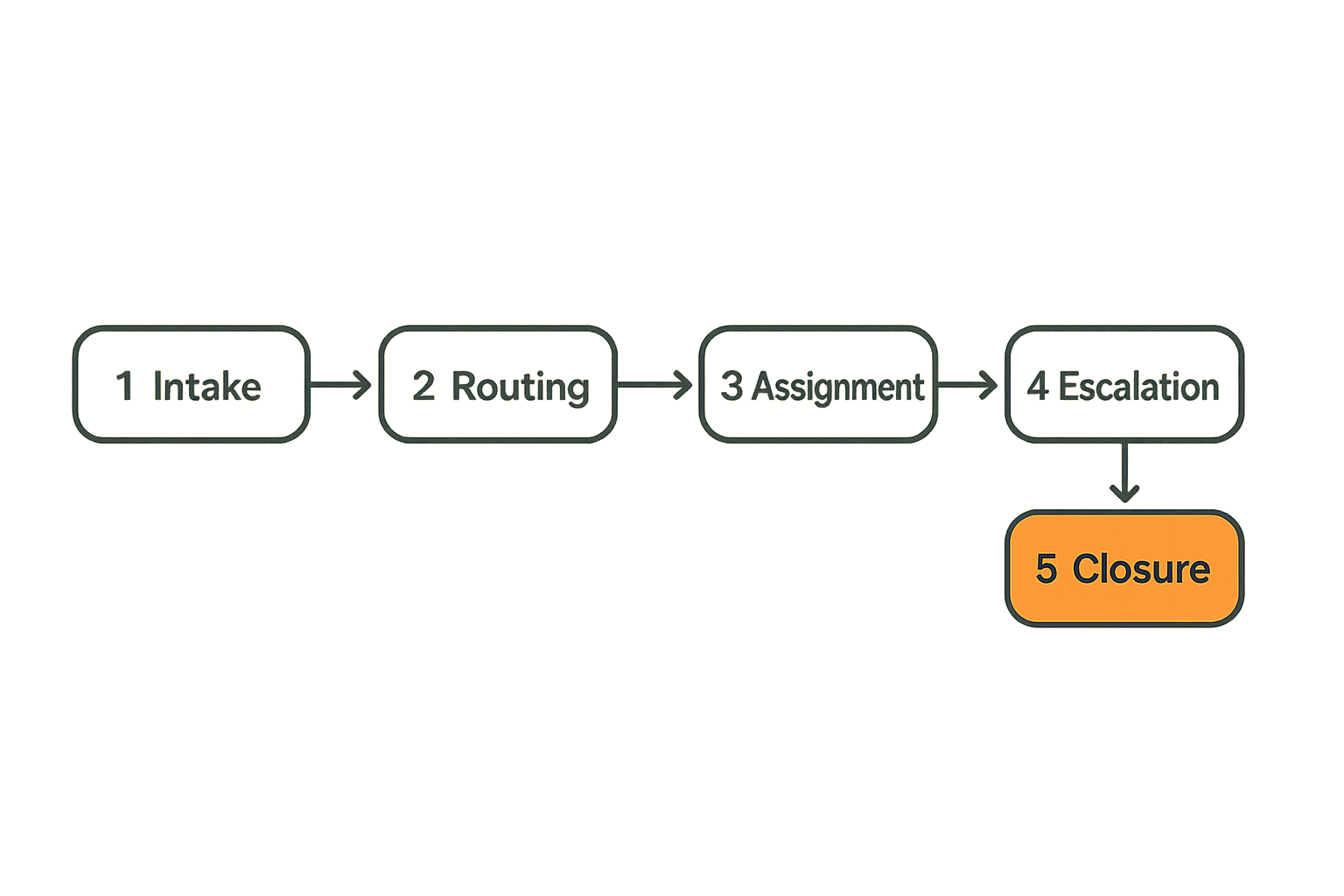
The operational workflow starts when a message arrives. Who owns it?
In small teams, a direct message may be enough. In larger teams, secure messaging needs queues, routing, and assignment. Otherwise, sensitive messages land in personal inboxes and disappear when someone is unavailable.
A practical intake model includes:
- A defined entry point for users
- Clear categories or queues
- Assignment to a responsible person or team
- Status visibility without exposing unnecessary content
- Time-based escalation
- A way to close the loop with the sender
The mistake teams make is using chat rooms as ticket queues without the controls of a ticket queue. That creates missed messages, duplicate responses, and unclear ownership.
Related reading from our network: remote teams dealing with shared displays and support workflows run into a similar ownership problem, covered in this article on Samsung TV remote workflows for remote teams.
Escalation and handoff
Escalation is where privacy and operations collide.
A staff member may need to bring in a supervisor, specialist, legal contact, or technical support person. If the only way to do that is forwarding, screenshotting, or copying content into another system, the secure messaging design has failed.
A better handoff model includes:
- Explicit participant addition
- Visible reason for escalation
- Least-privilege access to relevant context
- Event logging for access changes
- Clear removal after the need ends
- Sender-visible status where appropriate
Not every escalation should expose the full conversation history. Sometimes the new participant needs the whole thread. Sometimes they need only a summary or a specific attachment. The system should support that distinction.
Implementation sequence
A rollout works better when it follows the real workflow instead of the org chart. Start small, validate behavior, then expand.
- Map sensitive communication paths. Identify who sends what to whom, which channels are currently used, and where leakage happens.
- Classify message types. Separate routine coordination, sensitive personal content, official records, attachments, and urgent escalations.
- Define identity and device rules. Decide authentication, device enrollment, session lifetime, recovery, and offboarding requirements.
- Set retention and audit policy. Decide what is retained, what is deleted, what is logged, and who can see logs.
- Design routing and escalation. Assign queues, owners, response expectations, and handoff rules.
- Pilot with a real team. Use actual workflows, not artificial test messages.
- Review failure modes. Look for screenshots, email fallbacks, missed notifications, support friction, and unclear ownership.
- Expand with controls. Add teams only after the workflow is stable and supportable.
Practical rule: Pilot secure messaging with the messiest real workflow, not the cleanest demo scenario.
What works and what fails
What works
What works is usually boring and explicit.
Strong VA secure messaging programs do the following:
- Define communication categories before rollout
- Use strong authentication and device controls
- Keep notification previews minimal
- Separate admin rights from content access
- Make escalation visible and auditable
- Provide a supported recovery path
- Train users on concrete workflows
- Review logs and access changes regularly
- Keep insecure fallback channels out of the critical path
The important word is “supported.” If the secure workflow is slower, confusing, or incomplete, users will route around it. Security teams sometimes call that user error. Operators know better: if the approved path does not let people finish the job, the shadow path becomes the real system.
What fails
What fails is the feature-first rollout.
Typical failures look like this:
- “We enabled encrypted chat” but did not define ownership.
- “We require MFA” but allow indefinite sessions on unmanaged devices.
- “We have audit logs” but admins can read too much.
- “We support deletion” but attachments remain in exports.
- “We have a policy” but no one knows what to do during recovery.
- “We trained users” with generic privacy advice instead of workflow-specific rules.
The result is predictable. Messages are missed. Users paste content into email. Support creates exceptions. Admins gain too much power. Security review happens after an incident instead of during design.
Related reading from our network: local-network coupon workflows sound unrelated, but the same architecture lesson applies: incentives and coordination rules become infrastructure, as explained in this piece on coupon codes for local networks.
Comparison table
| Architecture choice | What works | What fails |
|---|---|---|
| Identity | User identity plus device trust | Login-only security |
| Notifications | Generic alerts with no sensitive preview | Subject lines or message text on lock screens |
| Admin model | Least-privilege roles | One super-admin role for everything |
| Escalation | Explicit handoff with audit trail | Forwarding, screenshots, copy-paste |
| Retention | Policy by message type | Keep everything forever by default |
| Recovery | Defined, logged, user-visible | Support shortcuts and silent resets |
| Audit | Event-focused and scoped | Content surveillance or useless logs |
| Rollout | Pilot with real workflows | Big-bang deployment after a demo |
The table is not theoretical. These are the choices that decide whether secure messaging survives contact with production.
Metrics that show secure messaging is working
Security metrics
If you cannot measure the workflow, you cannot operate it. Metrics should not become surveillance, but they should show whether the system is reducing risk.
Useful security metrics include:
- Number of active devices per user
- Stale sessions older than policy
- Recovery events per month
- Failed authentication patterns
- Admin privilege changes
- Export events
- Unusual access changes
- Messages routed through insecure fallback channels
The practical question is not “how many messages were sent?” That is product usage. The security question is whether the messaging system is keeping sensitive communication inside the intended boundary.
Workflow metrics
Secure messaging also has to work. If response times collapse or ownership is unclear, users will leave the system.
Useful workflow metrics include:
- Time to first response
- Time to assignment
- Reassignment frequency
- Escalation frequency
- Unclosed message threads
- Duplicate responses
- Messages requiring out-of-band follow-up
- Queue backlog by team
The goal is not to turn private communication into a call center dashboard. The goal is to detect workflow failure before users create insecure workarounds.
Support metrics
Support metrics reveal whether the system is understandable.
Track:
- Login support requests
- Device enrollment failures
- Recovery requests
- Notification confusion
- Attachment access issues
- Accidental logout complaints
- Reports of missing messages
- Requests to use email instead
When support volume spikes, do not assume users are careless. Assume a workflow edge is confusing until proven otherwise. Many secure systems fail because they are technically sound but operationally hostile.
Integration patterns for remote teams and regulated groups
Directory and SSO integration
For organizations, identity usually lives somewhere else: directory services, SSO, HR systems, membership databases, or contractor lists. Secure messaging needs to integrate without blindly inheriting bad access patterns.
Directory integration should support:
- Fast onboarding
- Fast offboarding
- Group-based access where appropriate
- Role mapping
- Deprovisioning active sessions
- Review of privileged accounts
The offboarding path matters most. If a user leaves a team, loses eligibility, or changes role, access should change quickly. A weekly manual cleanup is not enough for sensitive messaging.
Notifications without leaking content
Notifications are a privacy trap because they are designed to pull attention, not protect context.
A safe notification model avoids message content in places the system does not control:
- Lock screens
- Email subject lines
- SMS bridges
- Desktop banners
- Wearables
- Shared displays
- Browser notifications on unmanaged computers
Use generic alerts where possible: “You have a secure message.” Let the authenticated app reveal the content after unlock. This is less convenient than rich previews, but it prevents a common leak path.
For privacy-conscious users, notification behavior is often the difference between theoretical encryption and practical privacy. If private text appears on a shared screen, the encryption layer did its job and the workflow still failed.
APIs webhooks and export boundaries
APIs and webhooks can help secure messaging fit into operations, but they also create new exits for sensitive data.
Before enabling integrations, answer:
- What data leaves the messaging system?
- Is content included, or only status metadata?
- Where is the receiving system hosted?
- Who can access the destination?
- Are retries idempotent and logged?
- Are failed webhook deliveries visible?
- Can exports be limited by role and message type?
For many teams, the safest integration pattern is event-only: notify another system that work exists without sending private content. The user then returns to the secure channel to read or respond.
This is the same principle as notification design. Move state when necessary. Avoid moving secrets unless there is a strong reason.
Product fit: when qrypt.chat belongs in the architecture
Where qrypt.chat fits
qrypt.chat is relevant when the core requirement is private communication, secure messaging, and practical digital security without making every user become a cryptography expert.
In an architecture like this, qrypt.chat fits best as the protected communication layer: the place where sensitive conversations happen, where users expect privacy by default, and where teams want modern encryption choices without building messaging infrastructure themselves.
That does not mean every workflow problem disappears. You still need identity rules, device expectations, retention decisions, escalation practices, and user training. No serious secure messaging product should pretend otherwise.
The product fit is strongest when:
- Users need private one-to-one or group communication
- Remote teams need a safer alternative to email or consumer chat
- Sensitive content should not be scattered across tools
- Long-term confidentiality matters
- Operators want a clearer security posture than generic messaging apps provide
For readers comparing options, the qrypt.chat about page explains the product direction around end-to-end encrypted messaging and post-quantum cryptography in plain terms.
What to validate before rollout
Before using any encrypted messaging platform for a VA secure messaging-style workflow, validate the operating model.
Ask:
- Which users and devices are allowed?
- How are new devices approved?
- What happens when a device is lost?
- What notification content appears outside the app?
- What metadata is stored?
- Who can administer accounts?
- Can administrators read content?
- What happens during account recovery?
- Are attachments handled consistently?
- How will users escalate without screenshots?
- What is the offboarding process?
A pilot should include normal users, not only technical evaluators. Security professionals can review architecture. Operators can tell you whether the workflow will survive a busy day.
The closing point is simple: VA secure messaging is not solved by a logo, a portal, or a claim about encryption. It is solved by a working private communication architecture that protects content, controls context, and still lets people do their jobs.
Try qrypt.chat
qrypt.chat is for people who care about private communication, secure messaging, and practical digital security. If VA secure messaging is part of your 2026 workflow, start with the architecture and choose tools that respect it.